







LinkerBot O6
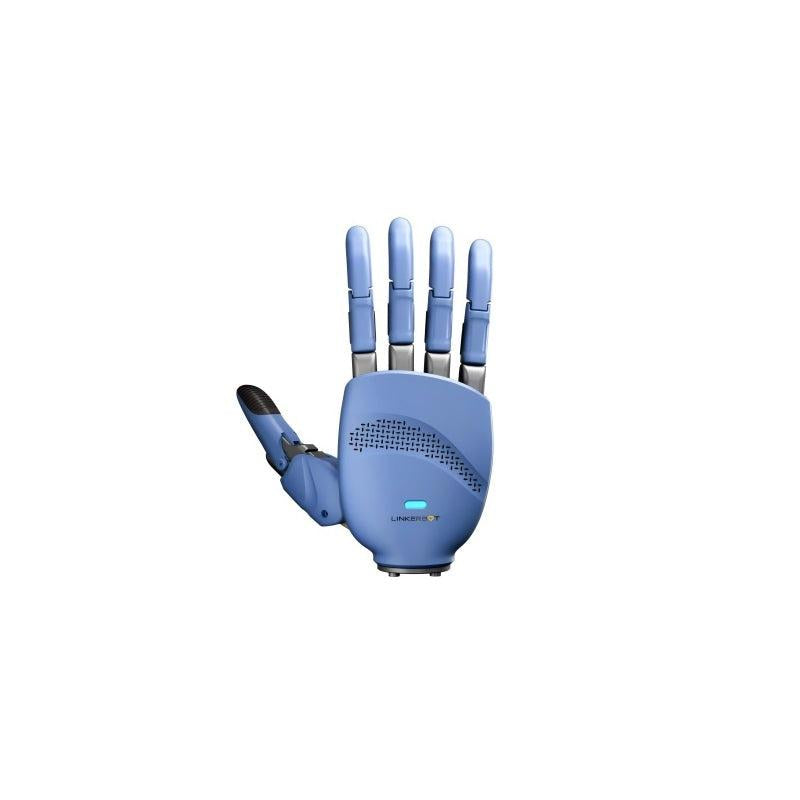
A 5-finger dexterous hand system with 12 DOF, glove-style teleoperation controller, 16-region tactile sensing, and USB serial integration. Three commands from unboxing to a live browser teleop session.
Full Hardware Specs
| Vendor | LinkerBot / Linker / Robotics Center |
| Total DOF | 12 per hand (5 fingers, 2-3 DOF each) |
| Fingers | 5 per hand, individual bend sensors |
| Tactile Regions | 16 per hand (capacitive) |
| Payload (per finger) | ~500 g tip pinch / ~2 kg power grasp |
| Repeatability | ±0.5 mm fingertip position |
| Max Finger Speed | ~300 deg/s |
| Hand Weight | ~580 g (hand unit only) |
| Power Supply | 12V DC, 3A peak |
| Hand Support | Left and right, simultaneous |
| Interface | USB Serial (/dev/ttyUSB0 Linux, COM* Windows) |
| Baud Rate | 921600 |
| Protocol | Robotics Center framing (AA 55 03 99 header) |
| Control Rate | 50 Hz command loop |
| Operating Temp | 0 - 45 C |
| SDK | pip install roboticscenter (Python 3.8+) |
| ROS2 Package | linkerbot_o6_ros2 (Humble / Iron) |
Use Cases
The LinkerBot O6 is designed for research labs, educational institutions, and data collection workflows that need reliable dexterous manipulation at an accessible price point.
Imitation Learning Data Collection
Pair with the glove controller to record dexterous manipulation demonstrations at 50 Hz. Episodes export as JSONL, compatible with ACT, Diffusion Policy, and custom pipelines via the Robotics Center data platform.
Manipulation Research
16 tactile regions give per-finger contact feedback for grasp stability analysis, slip detection, and in-hand regrasping experiments. Publish tactile data alongside joint state to ROS2 topics.
Robotics Education
The 15-minute setup time and browser-based teleop panel make O6 ideal for university courses and workshops. Students go from unboxing to a working teleop demo in a single lab session.
End-Effector Integration
Standard flange adapter mounts O6 on OpenArm 1, UR5e, Franka, or Kinova arms. The USB serial protocol means no CAN bus wiring -- just one cable to the host.
Why Choose the O6 Over Alternatives
Fastest Setup in Class
Three commands from unboxing to live browser teleop. No firmware flashing, no CAN bus wiring, no ROS dependency. Plug USB, install SDK, launch session. Most competing hands require 2-4 hours of setup including driver installation and bus configuration.
Integrated Glove Teleoperation
Ships with a matched glove controller for intuitive data collection. Calibrate open/closed fist, then record demonstrations immediately. Competing hands (Orca, Allegro) require separate teleoperation hardware purchased and integrated separately.
Built-In Tactile Sensing
16 capacitive tactile regions per hand included out of the box. No aftermarket sensor integration needed. The Allegro Hand has zero tactile sensing stock; the Orca Hand requires Paxini sensors added separately.
Cost-Effective for Labs
Priced well below the Shadow Hand ($100K+) and Allegro Hand ($15K+), the O6 provides 12 DOF and tactile sensing at a fraction of the cost. Leasing starts at a monthly rate that makes dexterous manipulation accessible to teaching labs and startups.
Dexterous Hand Comparison
| Feature | LinkerBot O6 | Orca Hand | Allegro Hand | Leap Hand |
|---|---|---|---|---|
| DOF | 12 | 17 | 16 | 16 |
| Fingers | 5 | 5 | 4 | 4 |
| Tactile Sensing | 16 regions (included) | Add-on (Paxini) | None stock | None stock |
| Glove Teleop | Included | Separate purchase | Separate purchase | Separate purchase |
| Setup Time | ~15 min | ~3-4 hrs | ~2 hrs | ~1 hr |
| Interface | USB Serial | USB Serial | CAN / EtherCAT | USB Serial |
| Open Source | SDK only | Full (MIT) | No | Full (MIT) |
| Approx. Price | Contact for quote | ~$2K BOM (DIY) | ~$15K+ | ~$2K BOM (DIY) |
| Best For | Fast data collection | Research customization | High-torque research | Low-cost research |
Python SDK & ROS2 Package
Control the O6 from Python in under 10 lines. The SDK handles serial framing, tactile decoding, and glove calibration automatically.
Python SDK -- Joint Position Control
ROS2 Integration
Your Setup Journey
From unboxing to live browser teleop in under 15 minutes. Three commands is all it takes.
Difficulty: Beginner-friendly. No soldering, no firmware flashing, no CAN bus.
Unboxing & USB Connect
Plug in O6 via USB, confirm port appears on Linux or Windows
SDK Install & Connect
pip install roboticscenter, then rc connect -- auto-detects the O6
Browser Teleop Panel
Open session URL -- finger positions, gesture presets, tactile heatmap
Glove Calibration
Calibrate glove to operator hand size -- open and closed fist positions
Data Collection
Start/stop episode recording from the browser panel -- JSONL format, platform-ready
Guides & SDK Docs
Everything from protocol internals to platform integration and data collection.
Services for LinkerBot O6
Data Collection Service
Our team collects dexterous manipulation demonstrations using O6 + glove at our San Francisco or Allston labs. You receive cleaned JSONL episodes ready for training.
Hardware Leasing
Lease the O6 (hand + glove bundle) on a monthly basis. Includes SDK access, firmware updates, and priority support. No long-term commitment.
Repair & Calibration
Send your O6 to our service center for recalibration, tendon replacement, or tactile sensor maintenance. Typical turnaround: 5 business days.
Also Consider
Community
Pricing & Availability
Pricing depends on hand configuration (left/right/pair), glove bundle, and quantity. Ships to the US and 30+ countries; contact us for other destinations. Contact Us for volume pricing or demo units.