

Booster T1 and T2: Price, Specs and Setup Guide (2026)
Booster Robotics' T1, the RoboCup-proven compact research humanoid, and its successor the T2: live US prices, cited specs, first-day setup, the open software stack and common faults.
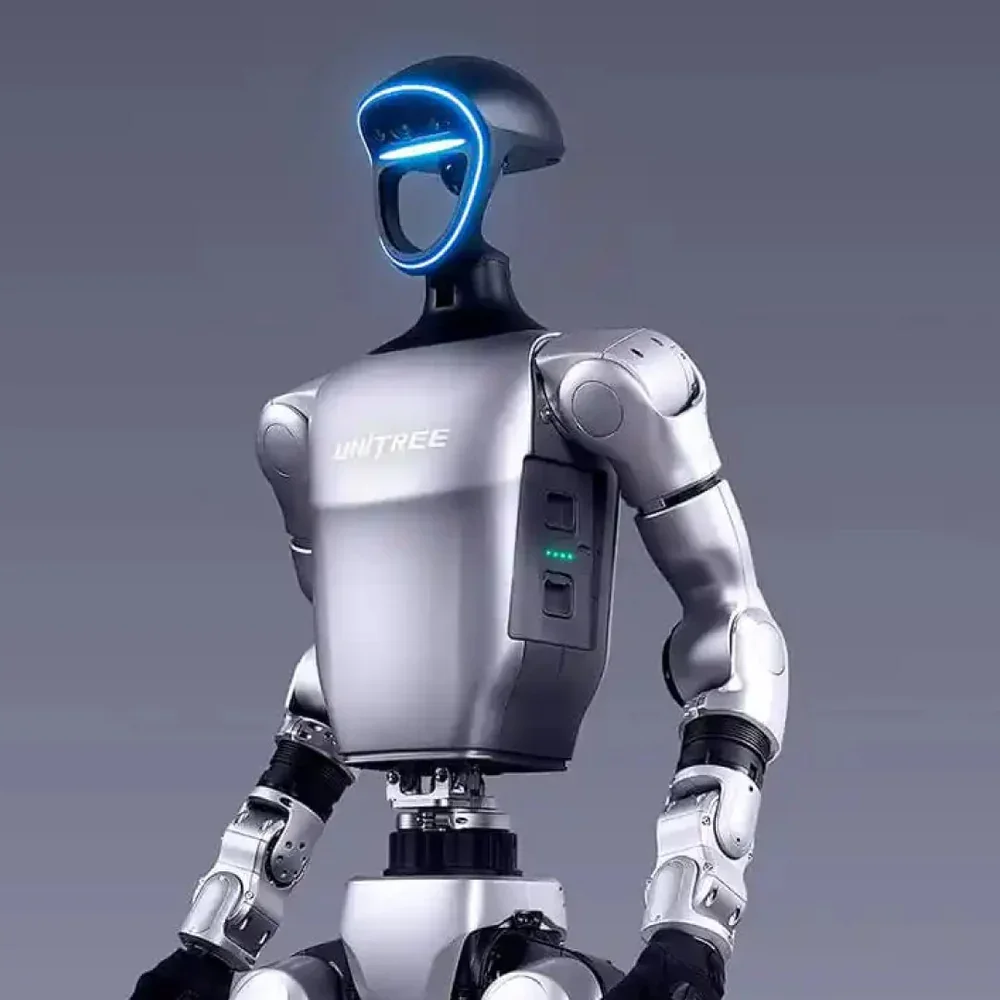
The Booster T1 is a compact research humanoid from Booster Robotics: about 1.2 m tall and 30 kg. Booster describes it as the choice of more than 50 robotics teams and research institutes, and it is popular with RoboCup teams and locomotion labs because it is open to development and ships with open-source training and deployment code. Booster's newer T2 is a larger, 31-DoF body aimed at the same developers. This guide compares the two, shows what each costs from our US store today (prices update from the store automatically), and covers first-day setup and the faults teams hit most.
Short answer: buy the T1 if you want the platform the RoboCup and RL-locomotion community already uses and its 1.2 m size suits your lab; buy the T2 if you need 7-DoF arms, a waist that bends and more onboard compute. If the robot is for teaching or a first project, look at the smaller, much cheaper Booster K1 instead.
Booster T1 and T2 prices in the US (live)
| Model | Our price | Who it is for |
|---|---|---|
| Booster T1 | Request a Quote | Locomotion, RL and RoboCup research at 1.2 m |
| Booster T2 | From $38,850.00 | Larger 31-DoF body for loco-manipulation and embodied-AI development |
| Booster K1 | From $11,998.00 | Entry platform for education, competitions and first humanoid projects |
Booster has offered the T1 in Basic, Standard and Customized versions, and the T2 in Education and Professional versions that differ mainly in compute. Each product page lists what ships today. Confirm the version, end effectors and compute with us in writing before you order.
Specs side by side
Booster's current site features the T2 and K1. The T1 figures below come from Booster's T1 page as archived in November 2025; the T2 figures from the T2 page.
| Booster T1 | Booster T2 | |
|---|---|---|
| Size | 118 × 47 × 23 cm; leg 57 cm, arm 45 cm | ≈140 cm standing |
| Weight | ≈30 kg | ≈42 kg |
| Degrees of freedom | 23: 6 per leg, 4 per arm (extensible), 1 waist, 2 head. 31 with grippers (7-DoF arms), 41 with dexterous hands | 31: 6 per leg, 7 per arm, 3 waist, 2 head |
| Max peak joint torque | 130 N·m, dual encoders | 140 N·m |
| Arm payload | Not published | 10 kg across both arms (depends on posture) |
| Walking speed | Not published | 3 m/s |
| Compute | NVIDIA AGX Orin (200 TOPS); Standard and Customized versions add an Intel i7-1370P | Education: ARM processor, 375 TOPS. Professional: NVIDIA Jetson Thor T5000 |
| Cameras | Depth camera | Binocular cameras in head and waist; wrist camera supported with gripper or hand |
| Other sensing | 9-axis IMU, 6-mic array and speaker | Microphone array and speaker; LiDAR optional |
| Battery | 10.5 Ah; ≈2 h walking, ≈4 h standing | 48 V, 10 Ah; ≈2 h continuous walking; magnetic charging port, charges while in use |
| Connectivity | Wi-Fi 6, Bluetooth 5.2, USB, Ethernet | Wi-Fi 6, Bluetooth 5.2, USB-C, Ethernet |
| Secondary development | Supported | Supported |
| Warranty (Booster) | 1 year | 1 year, extended warranty available |
Two consequences matter more than any spec line:
- The T1 is a locomotion platform first. Its base configuration has 4-DoF arms. If manipulation is part of the research, budget for the gripper or dexterous-hand version, or choose the T2 with its 7-DoF arms and binocular wrist-camera support.
- Both are open, and the code is public. Booster publishes its SDK, robot descriptions and training code on GitHub, so you can evaluate the software before you buy. Booster lists university users of the T1 on its archived page, including a table-tennis project at Purdue, the FALCON RL framework at Carnegie Mellon and the FastTD3 algorithm at UC Berkeley.
Which Booster should you buy?
- RoboCup, soccer and dynamic locomotion: T1. Booster calls it the 2025 RoboCup "AdultSize" champion model, and its robocup_demo is the official autonomous-play demo for the T1 and K1.
- RL locomotion research: T1 or T2. booster_gym trains in Isaac Gym with out-of-the-box T1 support; booster_train runs Isaac Lab tasks, including BeyondMimic motion tracking, on the T2, T1 and K1.
- Manipulation and teleoperated data collection: T2, or a T1 with the gripper or dexterous-hand version.
- Teaching, outreach and first projects: K1. It is 95 cm and about 19.5 kg, and costs a fraction of a T1. See the K1 hardware page.
- Full-size reach: step up to a Unitree H1 or H2, or compare everything in the humanoid comparison.
First day with a T1 or T2
- Clear a padded test area. A 30 to 42 kg robot that falls on a hard floor damages itself. Use foam mats or a soft floor, keep people out of the fall radius, and have a way to suspend the robot for joint-level tests.
- Charge the battery and connect the Booster App. The app handles network setup over Bluetooth and shows the robot's status. Update the firmware before the first walk: Booster's deployment tools require recent firmware (v1.7.2 or later for booster_deploy).
- First walk with the controller. Stand the robot up, walk it slowly, and practise the soft emergency stop until everyone who handles it can trigger it without thinking. The T2 also has a hard emergency stop.
- Set up the development host. Install the Booster Robotics SDK (C++, Ubuntu 22.04 on x86_64 or aarch64; the Python SDK installs with
pip install booster_robotics_sdk_python). For ROS 2, the robot provides the booster_ros2_interface messages for low-level state, motor commands, IMU and odometry. Build and run the bundled examples, starting with the high-level locomotion client, before writing your own code. - Simulate, then deploy. Train in Isaac Gym or Isaac Lab, check the policy in MuJoCo, then deploy with booster_deploy, which runs the same policy code in simulation and on the robot. Robot models live in booster_assets.
- Log from day one. Record low-level state, video and notes for every session.
Common problems and what to check first
- Deployment scripts fail on the robot. Check the firmware version first. booster_deploy needs firmware 1.7.2 or later, plus the robot's own ROS 2 interface sourced after your Python environment is activated.
- The robot falls when a low-level controller starts. A joint-level policy replaces the built-in balance controller. Start policies from a safe preparation pose with the robot supported, and check that the policy was trained for your exact DoF configuration (the T1 23-DoF and T2 31-DoF configurations are separate).
- Examples cannot reach the robot. The development PC must be on the robot's network; pass the robot's IP to the example clients exactly as the SDK README shows.
- Short runtime. Walking drains the pack about twice as fast as standing on the T1 (≈2 h against ≈4 h). The T2's magnetic port lets it charge while in use.
- Sim-to-real gap in a new gait. Test the policy in MuJoCo after Isaac training. booster_gym builds this cross-simulation check into its pipeline for that reason.
FAQ
How much does a Booster T1 cost in the US? Request a Quote in our store today, and From $38,850.00 for the T2. The entry-level K1 is From $11,998.00. Every humanoid we sell is priced in the humanoid robot price guide.
T1 or T2? The T1 is smaller and lighter, and Booster's original RL framework, booster_gym, supports it out of the box. The T2 is taller (≈140 cm), has 31 degrees of freedom including 7-DoF arms and a 3-DoF waist, and offers far more onboard compute. For manipulation, choose the T2.
Is it open to my own code? Yes. Booster lists secondary development as supported on both, and the SDK, ROS 2 interface, robot models and training code are on GitHub.
Is the Booster T1 affected by the FCC Covered List? On July 28, 2026 the FCC added foreign-produced "advanced robotic devices", which it defines as mobile robots such as humanoids and quadrupeds, to its Covered List. According to the FCC fact sheet, the update "does not prohibit the import, sale, or use of any existing models" the FCC previously authorized, and it "does not affect any previously purchased devices." New models generally cannot receive FCC authorization. If compliance matters for your organization, ask us for the FCC ID of the exact configuration before you order.
How long is the lead time? Each product page shows current availability and the delivery estimate.
Can I see one first? Contact us to arrange a visit to our San Francisco lab, or ask about leasing.