







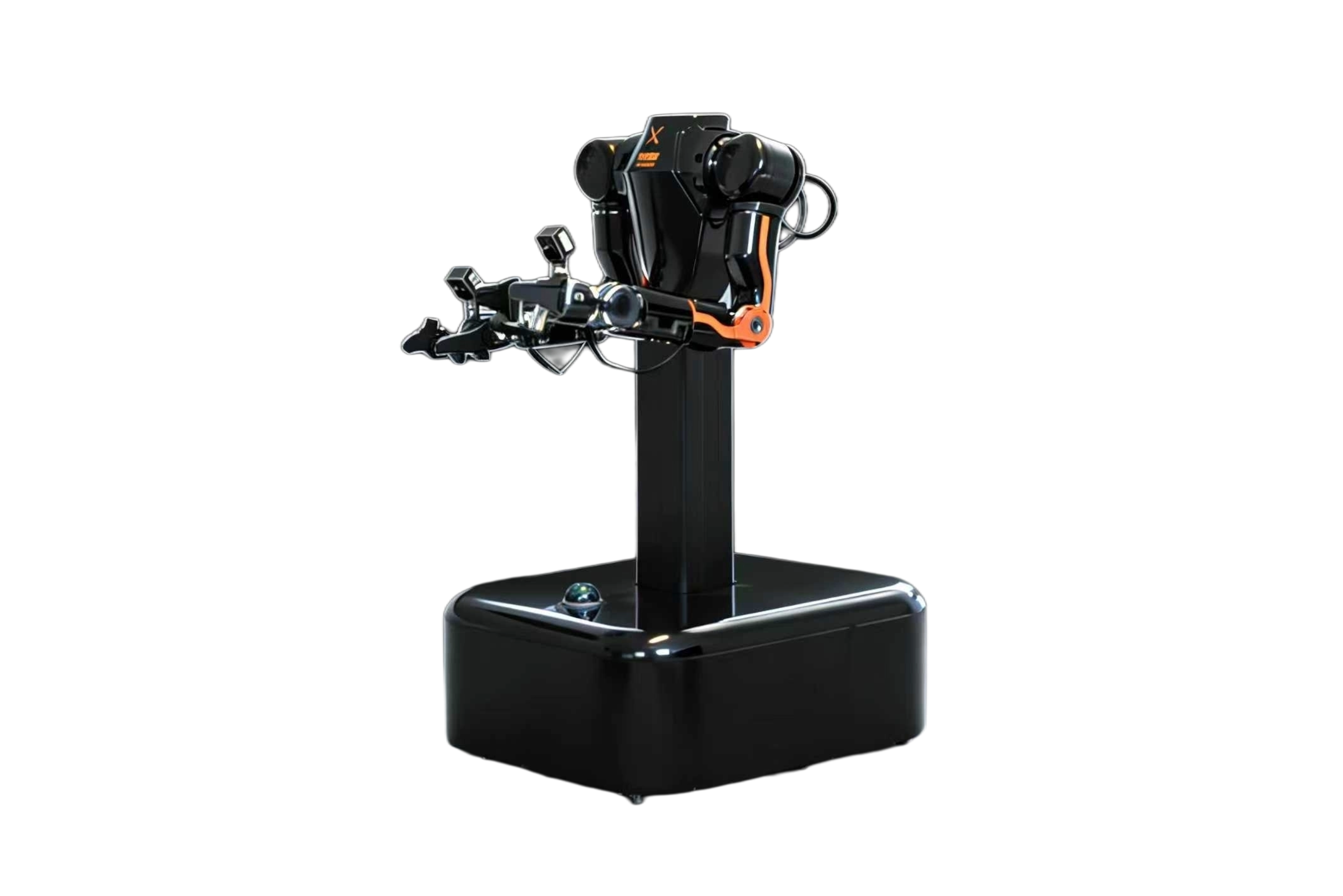
VLAI L1
L1 高性能移动操作双臂机器人

A high-performance mobile dual-arm robot built for manipulation research, imitation learning, and production teleoperation — sold in the US by RoboticsCenter.

Developer Max Recommended US Sales by RoboticsCenter ROS2 + MoveIt2 Isaac Sim / MuJoCo
16 DOF dual-arm ±0.02mm accuracy <10ms latency CAN-FD 5Mbps 6kg single-arm payload 2m/s mobile base

What is the VLAI L1?

The VLAI L1 (L1 高性能移动操作双臂机器人) is a mobile dual-arm manipulation platform designed by 深圳未来动力有限公司 (VLAI) and manufactured in China. RoboticsCenter distributes and supports the L1 in the United States, providing warranty service, SDK access, and integration with the Fearless Data Platform.

The L1 combines a two-wheel differential mobile base with a vertical linear lift and two 7-DOF arms — each equipped with a self-developed 8Nm gripper — giving researchers and developers a compact, high-accuracy platform for imitation learning, VLA training, and production teleoperation workflows.

Key differentiators

  • ±0.02mm repeat positioning accuracy via dual-encoder feedback and MIT motor protocol with FOC control.
  • <10ms end-to-end control latency over CAN-FD at 5Mbps — low enough for real-time force-sensitive manipulation.
  • 16 DOF total: 7 DOF + 1 gripper per arm, 6kg payload per arm (12kg combined), 63cm arm span.
  • Adjustable height from 106cm to 162cm via motorized linear lift at 30mm/s — covers table, shelf, and floor-level tasks without repositioning.
  • Simulation-first design: Isaac Sim, Isaac Lab, and MuJoCo environments ship with the Developer tier and above, enabling rapid sim-to-real transfer.
  • Native ROS2 + MoveIt2 — no middleware translation layer needed.

Hardware at a glance

Spec Value
Degrees of freedom16 total — dual arm: 7 DOF + 1 gripper each
Arm payload6kg per arm (12kg combined, Developer/Pro/Max); 2kg Youth
Arm span63cm
Gripper torque8Nm × 2 (self-developed)
Repeat positioning accuracy±0.02mm
Control latency<10ms
Motor protocolMIT motor protocol + FOC control + dual encoder feedback
BusCAN2.0 (Youth) / CAN-FD 5Mbps (Developer+)
Mobile baseTwo-wheel differential drive
Forward speed2m/s
Lift range106–162cm, 30mm/s
Footprint46cm W × 60cm L
Weight~38kg
Software stackROS2 + MoveIt2
SimulationIsaac Sim, Isaac Lab, MuJoCo
VendorVLAI (深圳未来动力有限公司), manufactured in China
US distributorRoboticsCenter

Get running in three steps

  1. Purchase your tier Order the L1 through RoboticsCenter at roboticscenter.ai/contact. We recommend the Developer tier for full SDK access, or Developer Pro if you need VR teleoperation from day one. Lead time is typically 6–8 weeks for US delivery.
  2. Install the SDK and connect Install the roboticscenter Python package and connect to the robot over your local network. The CLI opens a browser session automatically.
    bash
    pip install roboticscenter
    rc connect --device l1
    # Terminal: Session ready → https://platform.roboticscenter.ai/session/RC-XXXX-XXXX
  3. Open the browser teleop panel Navigate to the session URL printed in your terminal. The panel shows both arms in real time, base WASD controls, lift sliders, and a live frame counter. All data is streamed and auto-uploaded to your platform workspace.
No hardware? Run rc connect --device l1 --mock to start a mock session. All SDK methods and the browser panel work identically — useful for CI, workflow prototyping, and integration tests before your unit ships.

Choosing your L1 tier

The L1 ships in four tiers. All share the same mechanical frame and gripper hardware; the differentiators are the onboard compute controller, bus protocol, bundled software, and warranty.

Recommendation: Start with Developer for full SDK, ROS2, and simulation access. Upgrade to Developer Pro when you need VR teleop and VLA training. Choose Developer Max for wrist cameras, agent integration, and priority support at production scale.
Feature Youth
青春版
Developer Developer Pro ★ Developer Max
Price (USD) ~$3,950¥28,800 ~$8,050¥58,800 ~$17,600¥128,800
Single arm payload 2kg 6kg 6kg
Controller V1 V2 (10 TOPS) V5 (128 TOPS)
CAN bus CAN2.0 CAN-FD CAN-FD
Simulation Isaac Sim / Lab / MuJoCo Isaac Sim / Lab / MuJoCo
ROS2 + SDK
VR teleop
Chest camera
Wrist cameras (×2)
VLA training
Agent integration
Warranty 3 months 6 mo + pro support 2 yr + priority

★ Developer Pro is the recommended entry point for most research and small-team production deployments. Prices are approximate USD at current exchange rates; final quotes provided by RoboticsCenter.

Installation & connection

Requirements

  • Python 3.10+ (3.11 recommended)
  • L1 powered on and connected to the same local network as your workstation (Ethernet or 5GHz Wi-Fi)
  • Developer tier or above (Youth tier does not include SDK access)

Install

bash
pip install roboticscenter

Connect and stream frames

python
from roboticscenter import L1Robot

robot = L1Robot.connect()
print(robot.session_url)

for frame in robot.stream():
    joints = frame.data['joints']
    print(f"Left: {joints['left_arm']}")
    print(f"Right: {joints['right_arm']}")
    print(f"Base: {frame.data['base']}")

Mock mode (no hardware required)

Mock mode replays a synthetic joint trajectory and camera feed. The session URL, frame format, and all SDK methods are identical to live hardware — making it safe to develop and test data pipelines before your robot ships.

bash
# Test without hardware
rc connect --device l1 --mock
Session URL: Both live and mock sessions print a URL in the form https://platform.roboticscenter.ai/session/RC-XXXX-XXXX. Open it in any browser to access the teleop panel.

ROS2 + MoveIt2

The L1 runs a ROS2 node on its onboard computer. On Developer tier and above, you can subscribe to all standard joint and sensor topics from your workstation on the same network, or bridge them to the cloud via the robot agent.

Check available topics

bash
ros2 topic list

Key ROS2 topics

Topic Message type Description
/joint_states sensor_msgs/JointState All 16 DOF positions, velocities, and efforts at ~500Hz
/left_arm/cmd_joint trajectory_msgs/JointTrajectory Commanded trajectory for left arm (7-DOF)
/right_arm/cmd_joint trajectory_msgs/JointTrajectory Commanded trajectory for right arm (7-DOF)
/left_gripper/state sensor_msgs/JointState Gripper position and force estimate
/right_gripper/state sensor_msgs/JointState Gripper position and force estimate
/base/cmd_vel geometry_msgs/Twist Differential drive velocity command
/base/odom nav_msgs/Odometry Base odometry
/lift/state std_msgs/Float32 Current lift height in meters
/chest_camera/image_raw sensor_msgs/Image Chest RGB camera (Developer+ only)
/wrist_left/image_raw sensor_msgs/Image Left wrist camera (Developer Max only)
/wrist_right/image_raw sensor_msgs/Image Right wrist camera (Developer Max only)

Subscribe to joint states

bash
ros2 topic echo /joint_states

Launch the robot agent (cloud bridge)

Run the agent on the L1's onboard computer to bridge ROS2 topics to the platform session, enabling remote teleoperation and cloud data collection.

bash
# ROS2 agent (on robot's onboard computer)
python l1_robot_agent.py \
  --backend wss://platform.roboticscenter.ai \
  --session RC-XXXX-XXXX \
  --ros2
MoveIt2: The L1 ships with a MoveIt2 configuration package. Launch ros2 launch l1_moveit l1_moveit.launch.py to get full motion planning, collision checking, and Cartesian path planning on the dual-arm URDF.

Browser teleop panel

Open the session URL from rc connect to access the full browser-based teleop panel. No additional software installation is needed on the operator's machine.

Panel overview

  • Dual arm view — Real-time 3D visualization of both 7-DOF arms. Joint angles, end-effector pose (6D), and gripper state are displayed at <10ms update rate from the CAN-FD bus.
  • Base controls (WASD) — Keyboard or on-screen WASD drives the differential base at up to 2m/s. Speed scaling is adjustable via a slider (10%, 50%, 100%).
  • Lift controls — Vertical slider adjusts lift height between 106cm and 162cm in real time at 30mm/s.
  • End-effector mode selector — Switch the active end-effector type per arm independently: Gripper (default 8Nm), Dexterous hand, or Suction cup. Switching updates force/position limits accordingly.
  • Camera feeds — Chest camera stream (Developer+), and left/right wrist streams (Developer Max). Streams are displayed in-panel with configurable resolution.
  • Frame counter — Live frames-per-second and total frames captured in the current session, updated every 500ms.

VR teleop (Developer Pro and Max)

Developer Pro and Max tiers unlock VR headset control. Plug in an OpenXR-compatible headset and run rc vr --session RC-XXXX-XXXX to map hand controller pose directly to each arm's end-effector in Cartesian space, with haptic feedback proportional to estimated contact force.

Latency note: The L1's <10ms CAN-FD control loop runs on the onboard controller. Network round-trip (browser to cloud to robot) adds 20–80ms depending on your connection. For latency-critical tasks, co-locate the operator machine on the same LAN as the robot.

Session-based data collection

Every rc connect session is a named data collection unit. Sessions auto-upload to your Fearless Platform workspace on close — no manual export step required.

What gets captured per frame

  • Joint data — Position, velocity, and effort for all 16 DOF at the CAN-FD polling rate (~500Hz). Stored as float32 arrays with microsecond timestamps.
  • Camera streams — Chest RGB (all tiers with camera), wrist RGB (Developer Max). Each frame is timestamped and synchronized to joint data within ±1ms.
  • Force / contact signals — Gripper jaw force estimate from motor current, updated at joint polling rate.
  • Base state — Wheel odometry, linear and angular velocity, lift height.
  • Operator actions — Raw teleop command stream (keyboard, VR controller, or programmatic), stored alongside robot state for imitation learning.
  • Episode metadata — Session ID, tier, firmware version, task label (if set), start/end timestamps, and frame count.

Labeling during collection

Press Space in the browser panel to mark episode boundaries. Press L to annotate the current frame with a custom label string — useful for tagging successful grasps, failure events, or task transitions in real time.

From session to trained policy

After a collection session ends, the Fearless Platform provides a one-click pipeline that takes raw session data through cleaning, annotation, and policy training — all without leaving the browser.

  1. Clean Automatic filtering removes frames with sensor dropout, joint limit violations, or camera sync errors. A summary report shows how many frames were retained.
  2. Annotate Apply task labels, success/failure flags, and episode boundary corrections. The annotation studio shows synchronized joint, camera, and force timelines side-by-side.
  3. Train VLA / policy model Select a base model (ACT, Diffusion Policy, or custom VLA checkpoint) and launch a training run on the platform's GPU cluster. Training progress and eval metrics are streamed back to the browser.
Developer Pro and Max tiers unlock VLA training in the pipeline. Developer tier supports ACT and Diffusion Policy training only.

Dataset export

Cleaned and annotated sessions can be exported in LeRobot format (HDF5 + JSON manifest), RLDS, or raw JSONL + MP4. Use the Data tab in the platform to configure export format and download or sync to external storage.

Communication architecture

CAN-FD bus (onboard)

The L1 uses CAN-FD at 5Mbps (Developer, Pro, Max) between the onboard controller and all joints. CAN-FD's larger payload frame (up to 64 bytes vs. CAN2.0's 8 bytes) allows batching position, velocity, and torque data for all joints in fewer bus cycles, achieving the <10ms control loop latency. The Youth tier runs CAN2.0 which is sufficient for lower payload (2kg) operation but not recommended for high-frequency force-sensitive tasks.

ROS2 topics (LAN)

The onboard ROS2 node publishes the full topic list described in the ROS2 section above. Topics are available on the local network without any additional configuration once the robot is powered on.

WebSocket session relay (cloud)

The robot agent connects to the platform via WebSocket (wss://platform.roboticscenter.ai) and relays the following per session:

  • Bidirectional control commands (teleop → robot)
  • Outbound sensor streams (robot → platform) with per-frame sequence numbers for loss detection
  • Session control signals: start, pause, episode-boundary, label, stop
  • Heartbeat at 1Hz; reconnect with exponential back-off on disconnect
Bandwidth note: A Developer Max session with all three cameras (chest + two wrists) at 640×480 30fps can require 15–25Mbps upload. Use a wired Ethernet connection from the robot's onboard computer to your router for stable high-throughput sessions.

Common errors & fixes

CAN-FD bus not detected

The onboard controller cannot open the CAN-FD interface. Check that the CAN-FD cable is seated in the controller port (not the CAN2.0 port on Youth units). Run ip link show can0 on the robot's SSH shell. If the interface is down, run sudo ip link set can0 up type can bitrate 1000000 dbitrate 5000000 fd on. Reboot the controller if the interface still does not appear.

ros2 topic list returns empty

The ROS2 daemon is not running or the DDS discovery is failing across subnets. SSH into the robot and run ros2 daemon start. Confirm both your workstation and the robot are on the same subnet. If using a managed switch, check that multicast is not blocked. Set ROS_DOMAIN_ID to the same value on both machines (e.g., export ROS_DOMAIN_ID=42).

Session timeout / WebSocket disconnect

Sessions timeout after 60 seconds of no heartbeat. The most common cause is a firewall blocking outbound WebSocket on port 443. Check that wss://platform.roboticscenter.ai is reachable with wscat -c wss://platform.roboticscenter.ai/health. Corporate networks may require proxy configuration — set HTTPS_PROXY in your environment before running rc connect.

Joint position spikes / encoder errors

Intermittent spikes in /joint_states indicate dual-encoder disagreement, usually caused by a loose motor connector or EMI on the CAN bus. Check motor connectors at each joint. Ground the robot frame to your workspace ground. If spikes persist, run the built-in diagnostic: rc diagnose --device l1 --test encoders — this reports per-joint agreement statistics.

Mock mode: frames not advancing

If rc connect --device l1 --mock connects but the frame counter stays at 0, the mock playback process failed to start. Check that Python 3.10+ is active in your environment with python --version. Reinstall with pip install --force-reinstall roboticscenter. If the issue persists, file a bug at roboticscenter.ai/contact with the output of rc diagnose --mock.

What teams build with the L1

The L1's combination of mobile base, adjustable lift, dual 6kg-payload arms, and native simulation tooling makes it well-suited for a wide range of manipulation-centric deployments.

Home service

Fetch-and-place, counter cleaning, laundry folding, and table setting. The 106–162cm lift covers kitchen counter to standard shelf heights. 46×60cm footprint fits doorways.

Industrial manipulation

Bin picking, assembly insertion, quality inspection, and kitting. CAN-FD <10ms latency and ±0.02mm repeatability support precision assembly tasks at production rates.

Research & education

Imitation learning benchmarks, VLA model training, sim-to-real transfer experiments, and course labs. Isaac Sim and MuJoCo environments ship out of the box with Developer+.

Agriculture

Greenhouse harvesting, seedling transplanting, and crop inspection. The mobile base navigates row-and-aisle layouts; dual-arm coordination handles delicate pick-and-place at variable heights.

Get the VLAI L1

US sales and support by RoboticsCenter. We handle import, warranty, SDK access, and platform onboarding. Typical lead time 6–8 weeks.

New to robotics? Learn the fundamentals — arms, teleop, simulation, ROS 2 deployment — with the SVRC Robotics Academy before diving into SDK integration.
Have a question? Ask the community in the SVRC forum, or contact support directly.

Explore more hardware

Browse the full catalog, request a data program, or talk to the team.