







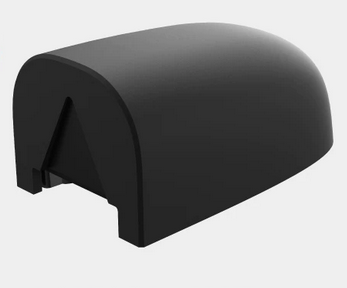
Paxini PX-6AX GEN3 Multidimensional Tactile Sensor

Complete integration guide for the PaXini PX-6AX GEN3 tactile sensor family: fingertip, palm, and finger-pad variants, communication boards, PXSR software stack, and Fearless Platform data collection.

Vendor: PaXini Model series: PX-6AX GEN3 Interface: USB (via communication board) Software: PXSR v1.0.7 (Windows x64)
Tactile Sensor 6-Axis F/T Fingertip Palm Finger Pad USB / SPI / I2C

1. Overview

The PaXini PX-6AX GEN3 is a family of high-resolution multidimensional tactile sensors designed for robotic fingertips, palms, and finger pads. The "6AX" designation denotes the sensor's ability to resolve contact forces and torques along all six spatial axes (Fx, Fy, Fz and Tx, Ty, Tz), going far beyond single-axis load cells or simple binary contact switches. This makes the GEN3 suitable for contact-rich manipulation tasks such as object stiffness estimation, grasp stability monitoring, slip detection, and high-fidelity tactile data collection for imitation learning.

The GEN3 series ships as individual sensor tiles in three anatomical form factors — fingertip (DP), finger pad (IP/CP), and palm (MC) — across several size variants. Each tile mounts to a compatible robotic hand or end effector, connects to one of three communication board options (SPI hub, serial converter, or high-speed integrated board), and streams data over USB to the host PC. The PXSR software suite provides real-time visualization, raw data export, and coordinate-mapped signal display using the per-variant XLSX taxel layout files included in the product bundle.

Typical users are robotic manipulation researchers integrating tactile feedback into dexterous hand platforms, and data collection teams building contact-rich demonstration datasets for behavior cloning and reinforcement learning pipelines.

2. Full Specifications

PropertyValue
VendorPaXini (帕西尼)
Model seriesPX-6AX GEN3 Standard Multidimensional Tactile Sensor
Sensing axes6 — Fx, Fy, Fz (normal + shear forces) and Tx, Ty, Tz (torques)
Sensor categoriesFingertip (DP), Finger Pad (IP/CP), Palm (MC), Integrated Fingertip+Pad (DP combo)
Host interfaceUSB (via communication board); raw sensor: SPI, I2C, or UART
Communication boards10-channel SPI hub; single-channel serial converter; high-speed integrated board
SoftwarePXSR v1.0.7 (pxsr-gen3-win-x64-1.0.7) — Windows x64
Signal coordinate arraysPer-variant XLSX files (taxel x/y coordinates in mm)
Signal code examplesC reference implementations: UART Example.c, SPI Example.c, I2C Example.c
Protocol documentationPaXini PX-6AX GEN3 Communication Board Communication Protocol v1.0.5
3D modelsIncluded in product bundle (3D Models folder)
Platform integrationFearless Platform teleop session (GloveWorkbench, tactile heatmap panels)

Sensor Variants

Every variant is identified by a part number in the format PX6AX-GEN3-{category}-{size}-{tier} and ships with a corresponding XLSX signal-coordinate file named PXSR-STD{category}03{suffix}.xlsx.

CategoryPart NumberDimensionsTierXLSX File
Fingertip (DP)PX6AX-GEN3-DP-L3530-Omega30mmOmegaPXSR-STDDP03A.xlsx
Fingertip (DP)PX6AX-GEN3-DP-M2826-Omega26mmOmegaPXSR-STDDP03B.xlsx
Fingertip (DP)PX6AX-GEN3-DP-S2716-Core16mmCorePXSR-STDDP03C.xlsx
Fingertip (DP)PX6AX-GEN3-DP-S1813-Core13mmCorePXSR-STDDP03D.xlsx
Fingertip+Pad (DP)PX6AX-GEN3-DP-S3013-Core13mm integratedCorePXSR-STDDP03E.xlsx
Fingertip (DP)PX6AX-GEN3-DP-S1813-Elite13mmElitePXSR-STDDP03F.xlsx
Fingertip (DP)PX6AX-GEN3-DP-S2015-Elite15mmElitePXSR-STDDP03G.xlsx
Finger Pad (IP)PX6AX-GEN3-IP-M2324-Core23×24mmCorePXSR-STDIP03A.xlsx
Finger Pad (IP)PX6AX-GEN3-IP-S1610-Elite16×10mmElitePXSR-STDIP03B.xlsx
Finger Pad (CP)PX6AX-GEN3-CP-L5325-Omega53×25mmOmegaPXSR-STDCP03A.xlsx
Finger Pad (CP)PX6AX-GEN3-CP-M3025-Core30×25mmCorePXSR-STDCP03B.xlsx
Palm (MC)PX6AX-GEN3-MC-M2020-Elite20×20mmElitePXSR-STDMC03A.xlsx

Communication Boards

Three communication board configurations are available. Choose based on the number of sensors and required data throughput:

BoardChannelsInterface to SensorHost InterfaceBest For
10-Channel SPI HubUp to 10SPIUSBMulti-finger arrays; full hand coverage
Single-Channel Serial Converter1UARTUSBSingle sensor prototyping and evaluation
High-Speed Integrated BoardMultipleSPI / I2CUSBHigh-frequency sampling; integrated deployments
Protocol documentation. The communication board protocol is detailed in the "PaXini PX-6AX GEN3 Communication Board Communication Protocol v1.0.5" PDF (included in the product bundle under 【05】Communication Board). This document defines the USB packet structure, register map, and data encoding used by all three board variants.

3. Quick Start

From unboxing to live data in PXSR:

  1. Mount the sensor and connect the communication board. Attach the GEN3 sensor tile to your robot fingertip, finger pad, or palm mount. Connect the sensor ribbon to the appropriate communication board. Plug the communication board USB cable into your Windows x64 host.
  2. Install the PXSR software. Run pxsr-gen3-win-x64-1.0.7_Release.exe from the 【04】 Software Installation Package folder. The installer registers the USB driver and places the PXSR executable in C:\Program Files\PaXini\PXSR\.
  3. Load the variant XLSX coordinate file. Open PXSR. Under File → Open Coordinate Map, select the XLSX file matching your sensor variant (e.g., PXSR-STDDP03B.xlsx for the 26mm fingertip). This maps raw sample indices to physical taxel positions on the sensor surface.
  4. Connect and visualize. Click Connect in PXSR. The live tactile heatmap renders immediately. Apply gentle pressure to the sensor surface to confirm signal response. Force/torque bars on the right panel show the 6-axis decomposition in real time.
  5. Export data. Use Record → Start to capture a session as a CSV or binary log. Each row contains a Unix timestamp, the 6-axis F/T values, and the full raw taxel array.
Windows x64 only for PXSR v1.0.7. The current PXSR release binary targets Windows x64 exclusively. Linux and macOS users must read sensor data directly via the C code examples (UART, SPI, or I2C) and implement their own visualization or use the Fearless Platform bridge described below.

4. SDK / Python Usage

The GEN3 product bundle includes three C reference implementations for reading sensor data directly over the raw interface, bypassing PXSR entirely. These serve as the foundation for custom integrations on Linux, embedded systems, or real-time control loops.

UART Example

For the single-channel serial converter board. Configure the serial port at the baud rate specified in the communication protocol document, then read frames using the packet structure defined therein:

/* UART Example.c — included in 【02】Code Example 通信例程 */
/* Open serial port, set baud rate per protocol doc, read frames */
int fd = open("/dev/ttyUSB0", O_RDWR | O_NOCTTY);
struct termios tty;
tcgetattr(fd, &tty);
cfsetispeed(&tty, B115200);   /* confirm rate from protocol doc */
cfsetospeed(&tty, B115200);
tcsetattr(fd, TCSANOW, &tty);
/* Read frame, parse 6-axis F/T values and taxel array */

Python wrapper (platform bridge)

For integration with the Fearless Platform, wrap the C UART reader in a Python subprocess or use pyserial directly. The following skeleton matches the JSONL telemetry format expected by the platform WebSocket:

import serial, json, time

ser = serial.Serial("/dev/ttyUSB0", baudrate=115200, timeout=0.1)

def read_frame(ser):
    # Parse according to PaXini GEN3 protocol doc v1.0.5
    raw = ser.read(64)           # frame size varies by board; see protocol doc
    ft = parse_force_torque(raw)  # your parser here
    taxels = parse_taxel_array(raw)
    return {"ts": time.time(), "ft": ft, "taxels": taxels}

while True:
    frame = read_frame(ser)
    print(json.dumps(frame), flush=True)  # emit JSONL for platform bridge

SPI multi-sensor (10-channel hub)

When using the 10-channel SPI hub, each channel is polled round-robin. The SPI Example.c in the product bundle demonstrates the select-and-read pattern. With 10 sensors at typical sample rates you can achieve full-hand tactile coverage at 100+ Hz aggregate throughput, sufficient for contact-onset detection and slip events in manipulation tasks.

Taxel coordinate mapping. Load the XLSX file for your variant to convert a raw linear taxel index i to physical coordinates (x_mm, y_mm). This is required when computing contact centroid, contact area, or rendering spatially-accurate heatmaps outside of PXSR.

5. Platform Integration

The Fearless Platform at platform.roboticscenter.ai supports tactile sensor streams as first-class nodes in a teleop session. The GEN3 sensor data is surfaced in the GloveWorkbench and TeleopCameraStreamsPanel UI components, which render real-time tactile heatmaps alongside joint-state and camera streams from the same session.

Registration sequence

  1. Start a teleop session via POST /api/teleop/sessions/create-sdk with device_type: "paxini_gen3".
  2. Connect the sensor bridge (Python script above) to the session WebSocket at /api/teleop/ws.
  3. Send the registration handshake: role: "robot", device_type: "tactile_sensor", capabilities: ["tactile", "force_torque", "telemetry"].
  4. On receiving type: "ready", begin streaming telemetry frames. Each frame should include type: "telemetry", the 6-axis F/T values, the flattened taxel array, and a Unix millisecond timestamp.

Telemetry frame format

{
  "type": "telemetry",
  "member_id": "paxini-fingertip-right",
  "device": "paxini_gen3",
  "variant": "PX6AX-GEN3-DP-M2826-Omega",
  "ft": {
    "fx": 0.12, "fy": -0.04, "fz": 1.83,
    "tx": 0.001, "ty": -0.002, "tz": 0.0
  },
  "taxels": [0.0, 0.02, 0.15, ...],  // flat array, length = variant taxel count
  "ts": 1743680400123
}

Episode recording

During an active recording session, all telemetry frames from the GEN3 sensor are archived as JSONL alongside hand joint positions and camera frames. The platform episode browser allows playback of the tactile stream with the spatial heatmap rendered using the variant XLSX coordinate map. Episodes are accessible for download or direct use in training pipeline APIs.

Multi-sensor sessions. The 10-channel SPI hub allows a single bridge script to multiplex data from all 10 sensor channels. Each channel should register as a separate node ID (e.g., paxini-thumb-tip, paxini-index-tip, etc.) so the platform can display and archive them independently.

6. Troubleshooting

Symptom Likely Cause Fix
PXSR shows no device USB driver not installed or communication board not powered Re-run the PXSR installer to register the USB driver. Confirm the board's power LED is on. Try a different USB port or cable.
All-zero taxel readings Sensor not connected to board, or ribbon cable seated incorrectly Reseat the sensor ribbon connector on both the sensor and board. In PXSR, verify the device status shows "Connected" and channel is active.
Wrong XLSX file loaded in PXSR Part number mismatch between sensor tile and coordinate file Cross-reference the part number printed on the sensor tile with the XLSX filename table. For example, the 26mm fingertip requires PXSR-STDDP03B.xlsx.
SPI hub: only first channel reads data Chip-select lines not correctly wired, or hub firmware out of date Verify the channel-to-sensor wiring matches the hub's channel numbering. Consult 【05】Communication Board wiring diagram. Update hub firmware if available.
Platform bridge drops frames at high Hz WebSocket send rate exceeds backend capacity Reduce sampling rate in your bridge script to 100 Hz or below for single-sensor sessions. For multi-sensor arrays, batch all 10 channels into a single frame object per tick to reduce message count.
Still stuck? Contact SVRC support and include your communication board variant, sensor part number, PXSR version, and operating system. Attach the PXSR log file from %APPDATA%\PaXini\PXSR\logs\.
New to robotics? Learn fundamentals — tactile sensing, manipulation, sim, ROS 2 — at the SVRC Robotics Academy before integrating hardware.
Have a question? Ask the community or contact support with your sensor part number and communication board variant.

Ready to collect tactile sensor data?

Register on the platform, bridge your GEN3 sensor, and start recording contact-rich demonstrations.