







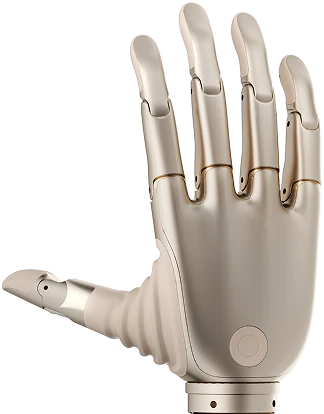
BrainCo Revo II Bionic Hand — USB CDC, BLE GATT & Python SDK Guide
Complete developer guide for connecting, calibrating, and programming the BrainCo Revo II bionic hand over USB-CDC serial or Bluetooth Low Energy, including the piano key press API and RoboticsCenter platform integration.
1. Overview
The BrainCo Revo II is a five-finger bionic hand developed by BrainCo, originally designed as a prosthetic device and adapted for robotic research applications. Its human-scale form factor and individual finger actuation make it well suited for dexterous manipulation research, piano-playing robots, teleoperation end-effectors, and imitation learning demonstration capture.
The Revo II features 6 total degrees of freedom: the thumb has two independent DOF (flexion and rotation, with rotation derived as 0.4× the flexion command), while index, middle, ring, and pinky each have one DOF for flexion. Position commands are expressed as a normalized 0.0–1.0 scale where 0.0 is fully open and 1.0 is fully closed.
Connectivity is flexible: the hand communicates over USB-CDC serial at 115200 baud for wired deployments, or over Bluetooth Low Energy (BLE) using a standard GATT profile for wireless use. Both transports use the same newline-terminated JSON command protocol, meaning application code is transport-agnostic. Telemetry streams at 10 Hz by default and can be raised for latency-sensitive applications.
Researchers choose the Revo II because it bridges prosthetics and robotics: its actuation profile and control API are designed to match human hand kinematics closely, making it an ideal end-effector for embodied AI experiments where natural hand poses and contact forces matter. The built-in piano mode demonstrates high-frequency, precise actuation with four-phase timing control that minimizes mechanical overshoot and key bounce.
2. Full Specs
| Property | Value |
|---|---|
| Vendor | BrainCo |
| Model | Revo II (left hand configuration) |
| Total DOF | 6 (thumb 2 DOF + index/middle/ring/pinky 1 DOF each) |
| Thumb DOF | Flexion + rotation (rotation = flexion × 0.4) |
| Finger DOF | 1 DOF flexion each: index, middle, ring, pinky |
| Position range | 0.0 = fully open · 1.0 = fully closed (normalized) |
| USB interface | USB-CDC (enumerated as /dev/ttyACM0 on Linux) |
| USB baud rate | 115200 |
| BLE service UUID | 0000ffe0-0000-1000-8000-00805f9b34fb |
| BLE write characteristic | 0000ffe1-0000-1000-8000-00805f9b34fb |
| BLE notify characteristic | 0000ffe2-0000-1000-8000-00805f9b34fb |
| Command protocol | Newline-terminated JSON over USB or BLE GATT write |
| set_finger command | {"cmd": "set_finger", "finger": 0–4, "position": 0–100} |
| set_pose command | {"cmd": "set_pose", "positions": [p0,p1,p2,p3,p4]} |
| calibrate command | {"cmd": "calibrate"} |
| Telemetry rate | 10 Hz default (configurable) |
| Calibration step | 120 ms per finger (wave sequence: thumb → pinky) |
| Piano hover position | 0.15 (15% closure — neutral ready-to-press) |
| Piano extend phase | 20 ms |
| Piano drive phase | 30 ms |
| Piano retract phase | 20 ms |
| Press depth range | 0.55–0.95 (proportional to velocity parameter) |
| URDF | Available for ROS1 and ROS2 |
| Platform agent | brainco_revo_agent.py |
| Python dependencies | pyserial (USB) · bleak (BLE) · websockets (platform) |
3. Quick Start
USB connection
-
Install dependencies.
pip install pyserial websockets
-
Connect the Revo II via USB and identify the port. On Linux the device enumerates as
/dev/ttyACM0(or ttyACM1 if other ACM devices are present). On Windows, open Device Manager and note the COM port.ls /dev/ttyACM* # Linux # or check Device Manager on Windows for COMx
On Linux, add your user to thedialoutgroup if you get a permission error:sudo usermod -aG dialout $USER # Log out and back in for the group change to take effect -
Open the port and send your first command.
import serial, json, time port = serial.Serial("/dev/ttyACM0", baudrate=115200, timeout=1.0) # Open all fingers def set_pose(positions): pcts = [int(p * 100) for p in positions] cmd = json.dumps({"cmd": "set_pose", "positions": pcts}) + "\n" port.write(cmd.encode("utf-8")) set_pose([0.0, 0.0, 0.0, 0.0, 0.0]) # fully open time.sleep(1.0) set_pose([0.0, 0.8, 0.8, 0.8, 0.8]) # point with thumb, close others time.sleep(1.0) set_pose([0.0] * 5) # open again port.close()
BLE connection
-
Install the bleak BLE library.
pip install bleak
-
Scan for the Revo II device and note its MAC address.
import asyncio from bleak import BleakScanner async def scan(): devices = await BleakScanner.discover(timeout=5.0) for d in devices: print(d.address, d.name) asyncio.run(scan()) # Look for a device named "BrainCo" or similar -
Connect and write a command via BLE GATT.
import asyncio, json from bleak import BleakClient WRITE_CHAR = "0000ffe1-0000-1000-8000-00805f9b34fb" ADDRESS = "AA:BB:CC:DD:EE:FF" # replace with your device address async def main(): async with BleakClient(ADDRESS) as client: # Close all fingers to 50% cmd = json.dumps({"cmd": "set_pose", "positions": [50,50,50,50,50]}) await client.write_gatt_char(WRITE_CHAR, cmd.encode("utf-8"), response=False) await asyncio.sleep(1.0) # Open all fingers cmd2 = json.dumps({"cmd": "set_pose", "positions": [0,0,0,0,0]}) await client.write_gatt_char(WRITE_CHAR, cmd2.encode("utf-8"), response=False) asyncio.run(main())
python brainco_revo_agent.py --mock --session test --self-test to execute a full self-test in mock mode. All finger positions, calibration, and piano press sequences are exercised without any physical device.
4. Protocol
The BrainCo Revo II uses a simple newline-terminated JSON protocol over both USB-CDC and BLE GATT. All commands are UTF-8 encoded. Position values in commands are integers in the range 0–100 (percent closure).
Command reference
| Command | JSON structure | Notes |
|---|---|---|
| Set single finger | {"cmd":"set_finger","finger":N,"position":P} |
N: 0=thumb, 1=index, 2=middle, 3=ring, 4=pinky. P: 0–100 (percent closure). USB: append \n. |
| Set all fingers | {"cmd":"set_pose","positions":[p0,p1,p2,p3,p4]} |
All five positions atomically. Values 0–100 each. Preferred for low-latency pose updates. |
| Calibrate | {"cmd":"calibrate"} |
Triggers firmware calibration after the host-side wave sequence completes. See calibration section. |
Finger index mapping
| Index | Finger | DOF | Notes |
|---|---|---|---|
| 0 | Thumb | 2 | Flexion commanded directly; rotation = flexion × 0.4 |
| 1 | Index | 1 | Flexion only |
| 2 | Middle | 1 | Flexion only |
| 3 | Ring | 1 | Flexion only |
| 4 | Pinky | 1 | Flexion only |
set_finger_position, set_hand_pose), pass floats 0.0–1.0.
5. SDK / Python Integration
The BrainCoReVoController class in brainco_revo_agent.py provides a high-level async API that abstracts over USB and BLE transports. Instantiate with mock=True for hardware-free development.
Core API
import asyncio
from brainco_revo_agent import BrainCoReVoController, PianoKeyPressAction
async def main():
ctrl = BrainCoReVoController(mock=False)
# USB: pass a port string
await ctrl.connect("/dev/ttyACM0")
# BLE: pass a MAC address
# await ctrl.connect("AA:BB:CC:DD:EE:FF")
# Set all fingers to 60% closure
await ctrl.set_hand_pose([0.6, 0.6, 0.6, 0.6, 0.6])
await asyncio.sleep(0.5)
# Open fully
await ctrl.set_hand_pose([0.0, 0.0, 0.0, 0.0, 0.0])
await asyncio.sleep(0.5)
# Set only the index finger to 80%
await ctrl.set_finger_position(1, 0.8) # 1 = index
await asyncio.sleep(0.5)
# Read current state snapshot
snap = await ctrl.snapshot()
print(snap["positions_dict"]) # {"thumb":0.0, "index":0.8, ...}
await ctrl.disconnect()
asyncio.run(main())
Mock mode
ctrl = BrainCoReVoController(mock=True) await ctrl.connect() # no-op in mock mode, always succeeds snap = await ctrl.snapshot() print(snap["connected"]) # True print(snap["mode"]) # "mock"
State snapshot fields
| Field | Type | Description |
|---|---|---|
| connected | bool | Hardware connection status |
| mode | str | "mock", "serial", or "ble" |
| positions | list[float] | 5 float positions [thumb, index, middle, ring, pinky], 0.0–1.0 with Gaussian noise in mock mode |
| positions_dict | dict | Named finger positions for easy access |
| is_pressing | list[bool] | Per-finger active press state (piano mode) |
| any_pressing | bool | True if any finger is mid-press |
| current_note | int | None | MIDI note number of the active press, if set |
| command_count | int | Total commands sent since initialization |
6. Piano Mode
The Revo II's piano mode implements a four-phase key press sequence that closely mimics human finger keystroke dynamics. This makes it suitable not only for piano-playing robots but also for any application requiring precise, repeatable, low-impact actuation — such as touchscreen or keyboard interaction.
Press sequence timing
| Phase | Duration | Finger position | Purpose |
|---|---|---|---|
| 1 — Extend | 20 ms | 0.15 (hover) | Ensure finger starts from neutral, avoid stuck-closed state |
| 2 — Drive | 30 ms | 0.55–0.95 (velocity-proportional) | Drive finger down to press depth at attack speed |
| 3 — Hold | configurable ms | press depth | Hold key depressed for note duration |
| 4 — Retract | 20 ms | 0.15 (hover) | Lift finger back to neutral hover, ready for next press |
Press depth is proportional to the velocity parameter (0.0–1.0, analogous to MIDI velocity): at velocity=0.0 the press reaches 0.55 closure; at velocity=1.0 it reaches 0.95 closure. Different fingers can press concurrently — each finger has its own asyncio lock so that rapid commands on the same finger are serialized without dropping notes.
Piano mode Python example
import asyncio
from brainco_revo_agent import BrainCoReVoController, PianoKeyPressAction
async def play_chord():
ctrl = BrainCoReVoController(mock=True)
await ctrl.connect()
action = PianoKeyPressAction(ctrl)
# Play a C major chord (concurrent presses on index, middle, pinky)
await asyncio.gather(
action.execute(finger=1, velocity=0.8, duration_ms=200.0, note=60), # C4
action.execute(finger=2, velocity=0.7, duration_ms=200.0, note=64), # E4
action.execute(finger=4, velocity=0.9, duration_ms=200.0, note=67), # G4
)
# Sequential melody on index finger
for note in [60, 62, 64, 65, 67]:
await action.execute(finger=1, velocity=0.75, duration_ms=150.0, note=note)
await asyncio.sleep(0.05) # small gap between notes
asyncio.run(play_chord())
7. Calibration
Calibration establishes per-finger travel limits in the firmware and should be run after first connection and after any mechanical adjustment. The calibration sequence is a wave: each finger from thumb to pinky closes to 90% and then opens, with 120 ms between steps.
Calibration sequence
- All fingers open to 0% closure.
- Wait 300 ms for mechanical settle.
- For each finger (thumb → index → middle → ring → pinky):
- Close to 90% closure — wait 120 ms.
- Open to 0% closure — wait 120 ms.
- All fingers settle at hover position (15% closure).
- Send
{"cmd": "calibrate"}to the firmware to lock in the learned limits.
import asyncio
from brainco_revo_agent import BrainCoReVoController
async def calibrate():
ctrl = BrainCoReVoController(mock=False)
await ctrl.connect("/dev/ttyACM0")
await ctrl.calibrate() # runs full wave sequence then sends calibrate cmd
await ctrl.disconnect()
asyncio.run(calibrate())
8. ROS2 Integration
The BrainCo Revo II ships with URDF files for both ROS1 and ROS2, describing the full finger kinematic chain including the thumb's two-joint structure. Use the URDF for visualization in RViz2, simulation in Gazebo, or as the source of truth for inverse kinematics.
Load URDF into ROS2 workspace
# Place the Revo II URDF in your workspace mkdir -p ~/ros2_ws/src/brainco_revo_description/urdf cp brainco_revo.urdf ~/ros2_ws/src/brainco_revo_description/urdf/ # Build cd ~/ros2_ws && colcon build --packages-select brainco_revo_description source install/setup.bash # Visualize in RViz2 ros2 launch brainco_revo_description display.launch.py
ROS2 bridge node pattern
Wrap the async controller in a ROS2 node to publish joint states and subscribe to pose commands:
import asyncio
import rclpy
from rclpy.node import Node
from sensor_msgs.msg import JointState
from std_msgs.msg import Float32MultiArray
from brainco_revo_agent import BrainCoReVoController
FINGER_NAMES = ["thumb", "index", "middle", "ring", "pinky"]
class BrainCoROS2Bridge(Node):
def __init__(self):
super().__init__("brainco_revo_bridge")
self.ctrl = BrainCoReVoController(mock=False)
self.loop = asyncio.get_event_loop()
self.loop.run_until_complete(self.ctrl.connect("/dev/ttyACM0"))
self.pub = self.create_publisher(JointState, "/brainco/joint_states", 10)
self.sub = self.create_subscription(
Float32MultiArray, "/brainco/set_pose", self.on_set_pose, 10
)
self.create_timer(0.1, self.publish_state) # 10 Hz
def on_set_pose(self, msg):
positions = list(msg.data)[:5]
self.loop.run_until_complete(self.ctrl.set_hand_pose(positions))
def publish_state(self):
snap = self.loop.run_until_complete(self.ctrl.snapshot())
js = JointState()
js.header.stamp = self.get_clock().now().to_msg()
js.name = FINGER_NAMES
js.position = snap["positions"]
self.pub.publish(js)
def main():
rclpy.init()
node = BrainCoROS2Bridge()
rclpy.spin(node)
if __name__ == "__main__":
main()
Key ROS2 topics (convention)
| Topic | Type | Description |
|---|---|---|
/brainco/joint_states | sensor_msgs/JointState | 5 finger positions, 0.0–1.0, 10 Hz |
/brainco/set_pose | std_msgs/Float32MultiArray | Command: 5 floats, set all finger positions |
/brainco/press | std_msgs/Int32MultiArray | Piano press command: [finger, velocity×100, duration_ms] |
9. Platform Teleop Integration
The brainco_revo_agent.py script connects the Revo II to the Fearless Platform teleop system, streaming finger state and accepting control commands from a browser session.
Starting the agent
# Install dependencies pip install pyserial websockets bleak # USB serial mode python brainco_revo_agent.py \ --serial /dev/ttyACM0 \ --backend wss://your-backend.run.app \ --session-id YOUR_SESSION_ID # BLE mode python brainco_revo_agent.py \ --ble-address AA:BB:CC:DD:EE:FF \ --backend wss://your-backend.run.app \ --session-id YOUR_SESSION_ID # Mock mode (no hardware) python brainco_revo_agent.py \ --mock \ --backend ws://localhost:8000 \ --session-id test-session # Self-test (no WebSocket, no hardware) python brainco_revo_agent.py --self-test
Telemetry frames
The agent emits two frame types per telemetry interval (default 10 Hz):
hand_state: Full Revo-specific frame with schemabrainco_revo.v1, including named finger positions dict, per-finger press state, current MIDI note, connection mode, and command count.telemetry: Generic platform-compatible frame withj1–j5joint positions (thumb–pinky) and aj6average. Allows the standard platform dashboard to display the hand without custom UI.
Supported command types from platform
| Type | Parameters | Effect |
|---|---|---|
piano_key_press | finger, velocity, duration_ms, note | Execute 4-phase piano press on specified finger |
set_pose | positions [list of 5 floats] | Set all fingers simultaneously |
set_finger | finger, position | Set a single finger position |
calibrate | — | Run full calibration wave sequence |
ping_latency | ts, id | Latency probe — agent replies with pong_latency |
Reconnect behavior
The agent implements exponential backoff reconnection: on WebSocket disconnect, it waits the reconnect-min-s duration (default 1 s), then multiplies by 1.7 on each subsequent failure up to reconnect-max-s (default 30 s). This ensures the agent recovers from transient network issues without flooding the backend with reconnects.
10. Troubleshooting
| Symptom | Likely cause | Fix |
|---|---|---|
| Port not found / No such file /dev/ttyACM0 | USB cable not connected, driver not loaded, or permission denied | Re-plug the USB cable. On Linux, confirm with ls /dev/ttyACM* and check dmesg | tail -20. Add user to dialout group: sudo usermod -aG dialout $USER then log out and in. |
| Corrupted or no response at 115200 | Wrong baud rate or port already open by another process | Confirm baud is exactly 115200. Check that no other program (e.g., Arduino IDE monitor, screen) has the port open. Only one process can hold the serial port at a time. |
| BLE connection fails / device not found | Device not in pairing mode, out of range, or already connected to another host | Power-cycle the Revo II to reset BLE advertisement. Ensure you are within 5 m. Disconnect any existing BLE host. Re-run the BLE scanner to confirm the address. Some hosts require the device to be paired before GATT writes are accepted. |
| Calibration inaccurate — finger positions drift | Calibration run with fingers restricted or hand not flat | Hold the hand open in free air — no glove, no restraint. Run await ctrl.calibrate() again. After the wave completes, fingers should rest at hover (15% closure). If a specific finger is stiff or binding, inspect for mechanical obstruction. |
| Piano presses sound weak or inconsistent | Velocity too low or hover position not set correctly | Increase velocity toward 1.0 for harder keystrokes. Confirm HOVER_POSITION (0.15) matches your mounting height above the keys. Adjust press depth in the velocity parameter: higher velocity → deeper press (0.95 max). |
python brainco_revo_agent.py --self-test. If self-test passes but hardware fails, the issue is connection-related. Post the output with the BLE address or serial port details in the community forum or contact support.
python brainco_revo_agent.py --self-test.