







ALOHA vs UMI: Which Data Collection System Is Right for You?
In-depth comparison of ALOHA and UMI data collection systems for robot imitation learning. Covers cost, setup, data quality, portability, task types, and when to use each system.
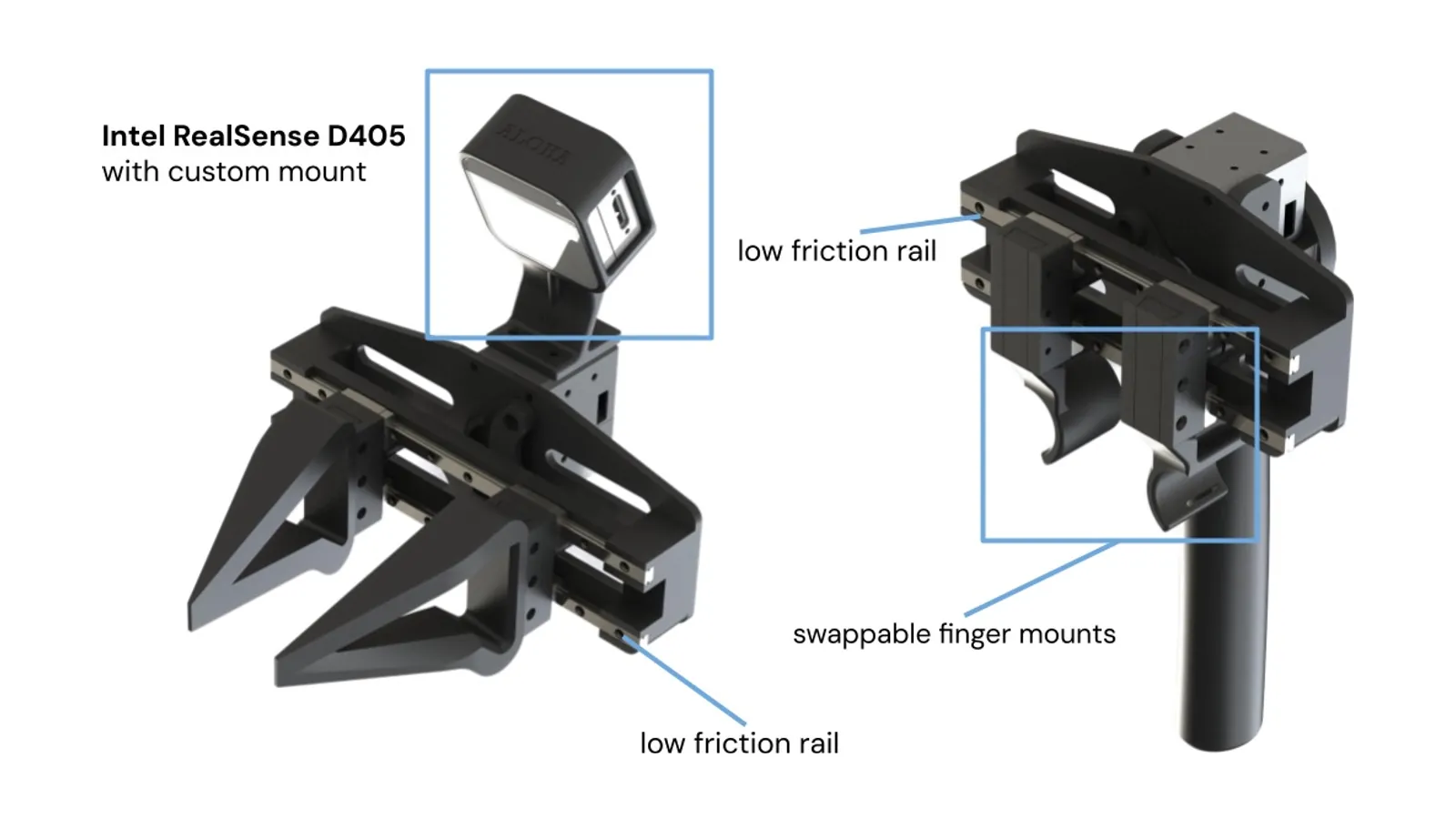
Collecting high-quality demonstration data is the bottleneck for imitation learning. Two systems have emerged as the dominant approaches: ALOHA (bilateral leader-follower teleoperation) and UMI (Universal Manipulation Interface, a handheld data collection device). They solve the same problem -- capturing human manipulation demonstrations -- through fundamentally different mechanisms, and the right choice depends on your task, team size, deployment target, and budget. This guide provides a detailed technical comparison to help you decide.
How ALOHA Works
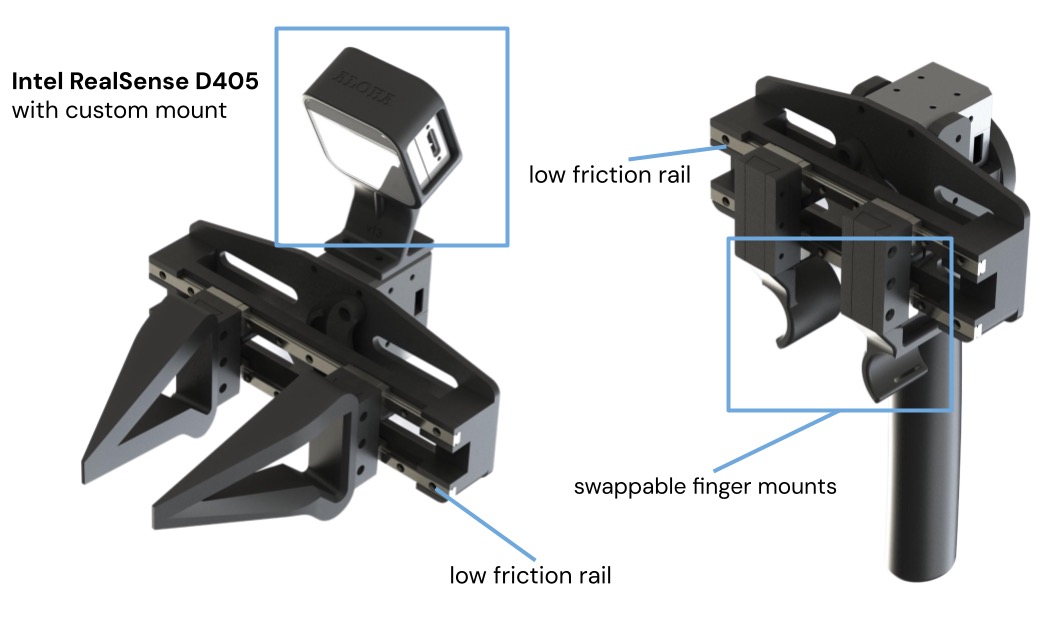
ALOHA (A Low-cost Open-source Hardware System for Bimanual Teleoperation) uses matched pairs of robot arms in a leader-follower configuration. The operator physically moves the leader arms, and the follower arms mirror those motions in real time. Joint encoders on both leader and follower arms record synchronized position trajectories at 50Hz, along with wrist and overhead camera images.
Key mechanism: The leader and follower arms are kinematically identical (both are ViperX 300 6-DOF arms with Dynamixel servos). When the operator moves a leader arm joint, the corresponding follower arm joint moves to match. This 1:1 mapping means the operator directly feels the follower arm's interactions with objects through the leader arm's servo feedback -- not true force feedback, but enough positional coupling that experienced operators develop an intuitive sense of contact.
Data format: ALOHA records joint positions (14 values: 6 joints + 1 gripper per arm), joint velocities, camera images (typically 2-4 cameras at 480p/30fps), and timestamps. The data is robot-native: joint trajectories can be replayed directly on the follower arms or used to train policies without any retargeting step.
Bimanual advantage: ALOHA's defining feature is bilateral teleoperation -- both arms are controlled simultaneously. This enables data collection for bimanual tasks (opening a jar while holding it, folding fabric, pouring from a bottle into a cup) that are impossible to demonstrate with single-arm systems. The ACT policy architecture was specifically designed to handle ALOHA's bimanual action space.
How UMI Works
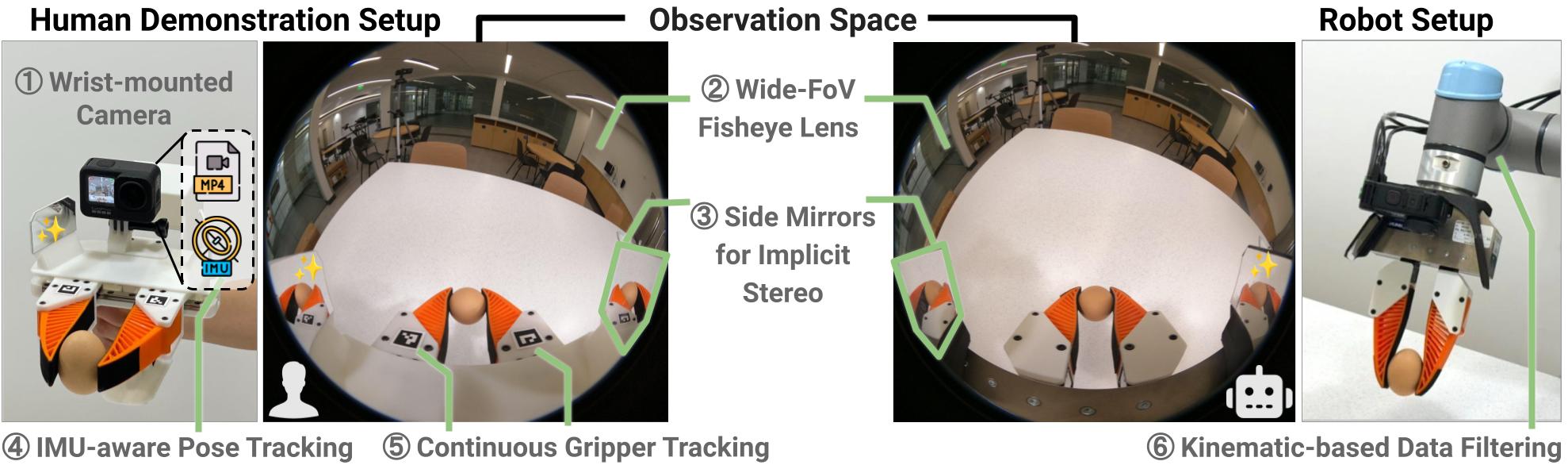
The UMI (Universal Manipulation Interface) is a handheld gripper instrumented with cameras and an IMU. The operator holds UMI like a tool and performs the manipulation task directly -- no robot arm is present during data collection. External tracking (ArUco markers or SLAM) captures the 6-DOF pose of the UMI in the environment, while the onboard camera records the gripper-eye view and the finger encoder records gripper aperture.
Key mechanism: UMI decouples data collection from robot hardware. The operator works at human speed and dexterity, unconstrained by robot kinematics, workspace limits, or servo bandwidth. The recorded trajectory (end-effector pose over time) is later retargeted to the deployment robot using inverse kinematics. This retargeting step converts Cartesian pose trajectories to joint angle trajectories for the specific robot arm being used.
Data format: UMI records end-effector 6-DOF pose (position + orientation), gripper aperture, wrist camera images, and timestamps. The pose is in the world frame, not in any robot's joint space. Before training, the trajectories must be retargeted to the target robot -- a computationally lightweight step but one that introduces 2-5mm of end-effector position error due to IK approximation and kinematic differences.
Portability advantage: UMI can be used anywhere -- a kitchen, a factory floor, an office, outdoors. The operator does not need a robot, a workstation, or any infrastructure beyond the UMI device and a laptop. This enables data collection in the actual deployment environment, with real lighting, clutter, and object variation, producing more diverse training data than lab-only collection.
Dex-UMI: Dexterous Extension
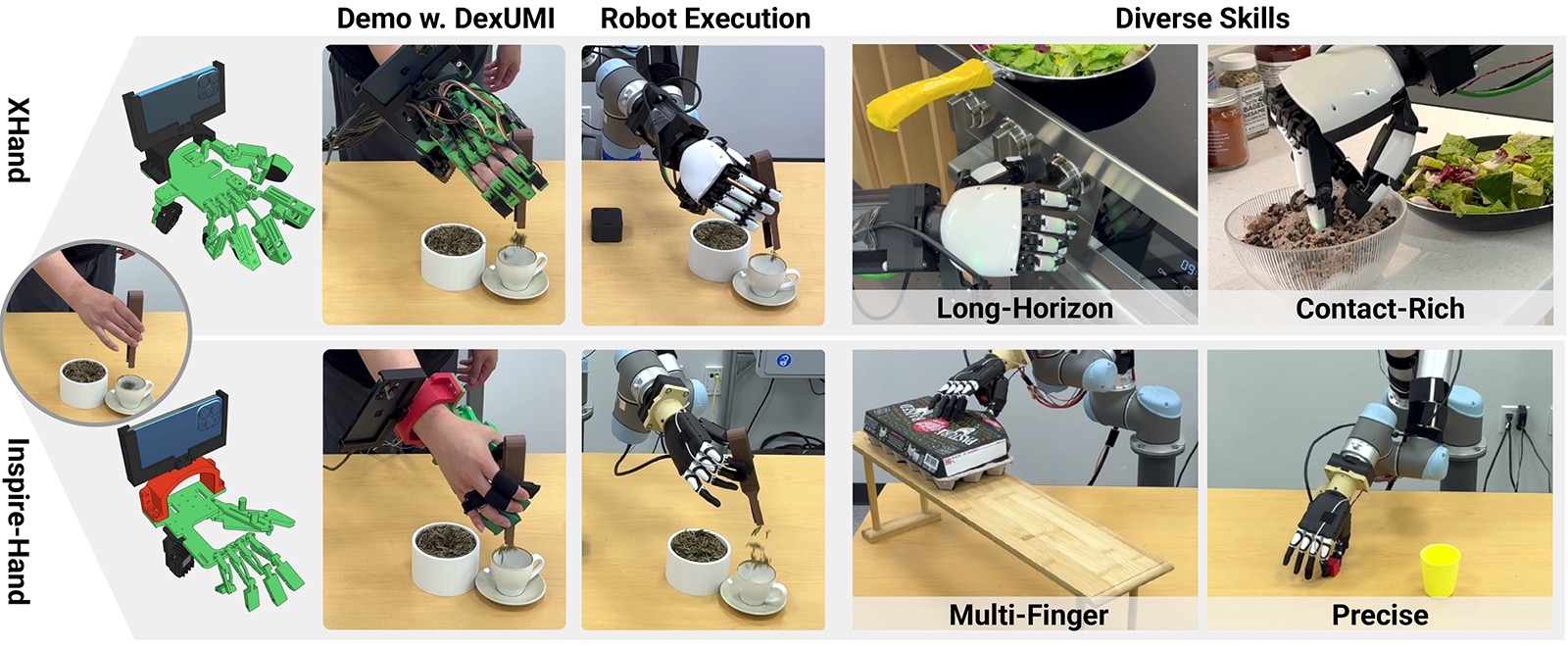
Dex-UMI extends UMI to dexterous manipulation. Instead of a parallel-jaw gripper, Dex-UMI uses an instrumented glove that captures individual finger joint angles (20+ DOF), fingertip contact forces, and wrist pose. This enables data collection for tasks that require multi-finger coordination: pinch grasps, in-hand reorientation, tool manipulation, and fine assembly.
When to use Dex-UMI: If your deployment robot has a dexterous hand (LEAP Hand, Allegro Hand, or similar multi-finger end-effector) and your tasks require finger-level control, Dex-UMI is the only portable data collection option. Standard UMI captures only gripper open/close, and ALOHA leader arms have only single-DOF grippers. Dex-UMI fills the gap between simple gripper demonstrations and full dexterous manipulation data.
Quick Decision
Need bimanual? → ALOHA. Need portability? → UMI. Need dexterous? → Dex-UMI.
Head-to-Head Comparison
| Criterion | ALOHA | UMI | Dex-UMI |
|---|---|---|---|
| Cost | $3,000-$4,000 (full system) | RCSV UMI, per unit: $1,250.00 | RCSV Dex-UMI, per unit: $9,800.00 |
| Setup time | 2-4 hours (assembly + calibration) | 15-30 minutes | 30-45 minutes |
| Operator training | 2-4 hours (bimanual coordination) | 10-15 minutes | 30-60 minutes |
| Demos per hour | 20-60 (single system) | 60-100 per operator | 40-70 per operator |
| Parallelizable | No (1 operator per system) | Yes (N operators = N units) | Yes (N operators = N units) |
| Data quality | High (robot-native joints) | Medium (retargeting error) | Medium (finger retargeting) |
| Retargeting needed | No | Yes (IK solve) | Yes (finger mapping + IK) |
| Bimanual support | Native (2 arms) | Limited (2 UMIs, no sync) | No |
| Portability | Low (robot + table + power) | High (handheld + laptop) | High (glove + laptop) |
| Dexterous tasks | No (1-DOF gripper) | No (1-DOF gripper) | Yes (20+ DOF fingers) |
| Environment diversity | Low (fixed lab setup) | High (any location) | High (any location) |
| Policy frameworks | ACT, Diffusion Policy, LeRobot | Diffusion Policy, ACT (retargeted), VLA | Diffusion Policy, custom |
Data Quality: The Critical Difference
ALOHA produces robot-native joint trajectories. When the operator moves the leader arm to position X, the follower arm's encoder records the exact joint angles needed to reach position X. This data can be replayed on the follower arm or used directly for policy training without any transformation. The only noise source is servo quantization and backlash, which is small (0.1-0.3 degrees per joint for Dynamixel XM series).
UMI produces Cartesian end-effector trajectories that must be retargeted to the deployment robot. The retargeting step introduces error from three sources: (1) IK solver approximation (the solver may not find the exact same configuration the robot would naturally use), (2) kinematic mismatch between the human operator's arm and the robot arm (different link lengths, joint limits, workspace shape), and (3) tracking noise from the external pose estimation (ArUco markers have 1-3mm position noise depending on distance and lighting).
In practice: For tasks with 5mm+ positioning tolerance (most pick-and-place, pouring, stirring), UMI retargeting error is negligible and both systems produce equivalent policy performance. For tasks requiring sub-2mm precision (peg insertion, connector mating, precise placement), ALOHA's robot-native data produces measurably better policies. If precision is critical, use ALOHA or supplement UMI data with a smaller set of on-robot demonstrations for fine-tuning.
Scaling Data Collection: Where UMI Wins
The fundamental scaling advantage of UMI is parallelism. One ALOHA system can collect data from one operator at a time. Ten UMI devices can collect data from ten operators simultaneously, in ten different environments, producing ten times the data diversity per unit time.
Cost-per-demonstration comparison:
- ALOHA: $4,000 system, 40 demos/hour, $100/hour operator cost = $2.50 per demonstration amortized (excluding hardware amortization).
- UMI (single): $800 device, 80 demos/hour, $30/hour operator cost (non-expert) = $0.38 per demonstration.
- UMI (10 devices, 10 operators): $8,000 total hardware, 800 demos/hour, $300/hour total operator cost = $0.39 per demonstration, but 20x the throughput.
For projects requiring thousands of demonstrations (VLA training, multi-task datasets, cross-environment generalization), UMI's cost and throughput advantages are decisive. RCSV's data collection services can deploy UMI teams for large-scale campaigns.
Task Type Decision Framework
Use this decision tree to choose between ALOHA and UMI for your specific task:
- Does your task require two arms simultaneously? If yes: ALOHA. UMI cannot capture synchronized bimanual data. Examples: folding laundry, opening a jar, two-handed assembly.
- Does your task require dexterous finger manipulation? If yes: Dex-UMI. Neither ALOHA nor standard UMI captures multi-finger data. Examples: tool use, in-hand reorientation, pen manipulation.
- Do you need data from diverse real-world environments? If yes: UMI. Collecting data in 20 different kitchens produces more robust policies than collecting 20x more data in one lab. Examples: home robot tasks, object picking in varying clutter.
- Do you need more than 1,000 demonstrations? If yes: UMI. The parallel scaling makes large datasets economically feasible. Examples: VLA fine-tuning, multi-task training, cross-object generalization.
- Does your task require sub-2mm precision? If yes: ALOHA (or on-robot teleoperation). The retargeting error in UMI data degrades precision tasks. Examples: peg insertion, connector mating, circuit board assembly.
- Will you deploy on ALOHA hardware? If yes: ALOHA. Zero retargeting error means the best possible policy performance on this specific hardware.
- For everything else: Start with UMI for its speed and flexibility, then supplement with on-robot demonstrations if policy performance plateaus.
Combining ALOHA and UMI
The most effective data collection strategies use both systems. A practical workflow:
- Phase 1 -- UMI for breadth (weeks 1-2): Deploy UMI devices to collect 500-2,000 demonstrations across diverse environments, objects, and operators. This builds the foundation dataset with high variation. Use non-expert operators (minimal training) to capture natural task execution.
- Phase 2 -- ALOHA for depth (weeks 3-4): Use ALOHA to collect 100-300 high-quality demonstrations of the hardest subtasks identified in Phase 1. Focus on precise manipulation steps, bimanual coordination, and edge cases where UMI data was insufficient. Use expert operators for maximum data quality.
- Phase 3 -- Co-training: Train the policy on the combined dataset, weighting ALOHA demonstrations higher for precision-critical task segments. The Fearless Data Platform supports mixed-source datasets with per-demonstration quality weights.
This combined approach typically produces 15-30% better policy performance than either system alone, because it combines UMI's environmental diversity with ALOHA's robot-native precision.
Hardware Compatibility
Both ALOHA and UMI data can train policies for deployment on a wide range of robot arms. Here is the compatibility matrix:
| Deployment Robot | ALOHA Data | UMI Data | Notes |
|---|---|---|---|
| Mobile ALOHA | Native (zero retargeting) | Retarget via IK | Best results with ALOHA data |
| OpenArm | Retarget (different kinematics) | Retarget via IK | Both require retargeting; UMI more natural |
| Franka FR3 | Retarget (different kinematics) | Retarget via IK | 7-DOF IK has more solutions; quality depends on solver |
| UR5e | Retarget (different kinematics) | Retarget via IK | UR analytical IK gives deterministic retargeting |
| AgileX Piper | Retarget (different kinematics) | Retarget via IK | Shorter reach may clip some UMI trajectories |
Camera Setup Comparison
Camera configuration differs significantly between the two systems, and this affects which visual observations are available for policy training.
ALOHA cameras: Typically 3-4 cameras: one wrist camera per arm (2 total) and 1-2 overhead/third-person cameras. The wrist cameras move with the arm, providing a consistent gripper-eye view. The overhead cameras are fixed. All cameras are calibrated relative to the robot base frame, providing consistent spatial relationships between visual observations and joint positions.
UMI cameras: One onboard wrist camera per UMI device, plus optional external cameras. The wrist camera is rigidly mounted to the gripper and provides the same gripper-eye view as ALOHA wrist cameras. External cameras, if used, must be calibrated to the ArUco marker frame for each collection session. The key difference: UMI's external cameras see the operator's hand and arm, not a robot, so policies trained on UMI third-person views must generalize from human-hand appearance to robot-arm appearance at deployment time.
Practical recommendation: For wrist-camera-only policies (ACT with wrist view, eye-in-hand Diffusion Policy), ALOHA and UMI produce equivalent visual data. For policies that use third-person views, ALOHA data is preferable because the visual appearance matches deployment. If using UMI with third-person cameras, train on wrist-camera views only, or use domain randomization to bridge the appearance gap.
The RC G1 Tactile Glove as a Data Augmentation Layer
The RC G1 Tactile Glove adds tactile sensing to any data collection workflow. When worn during ALOHA teleoperation, it records the operator's finger contact forces on the leader arm grippers. When worn during UMI collection, it records finger forces on the UMI handle. This tactile data can train policies that react to contact forces -- detecting slip, modulating grip force, or sensing object stiffness -- capabilities beyond what vision-only policies provide.
Frequently Asked Questions
What is the difference between ALOHA and UMI?
ALOHA is a bilateral leader-follower teleoperation system where the operator controls matched robot arms to perform tasks while the follower arms record joint trajectories. UMI is a handheld gripper device that the operator uses directly in the environment -- no robot arm needed during data collection. ALOHA captures robot-native joint data; UMI captures task-space trajectories that must be retargeted to the deployment robot.
Is ALOHA or UMI better for data collection?
It depends on your use case. ALOHA is better when you need bimanual data, robot-native joint trajectories, or are deploying on ALOHA hardware. UMI is better when you need portability (collect data anywhere without a robot), want to parallelize data collection across many non-expert operators, or plan to deploy on multiple robot platforms. UMI data requires a retargeting step; ALOHA data is ready to train immediately.
How much does ALOHA cost vs UMI?
Mobile ALOHA is a complete system (2 leader arms + 2 follower arms + mobile base); current store price: $20,000.00. Stationary ALOHA (4 ViperX arms without the base) costs approximately $3,000. The RCSV UMI (current store price per unit: $1,250.00) is sold per unit, and multiple units can be deployed simultaneously for parallel data collection. At scale, UMI is significantly cheaper per demonstration collected.
Can I use UMI data to train policies for ALOHA?
Yes, but it requires trajectory retargeting. UMI captures end-effector poses in Cartesian space, which must be converted to joint angles for the ALOHA arms using inverse kinematics. This retargeting introduces some error (typically 2-5mm end-effector position error) but is adequate for most manipulation tasks. LeRobot and the Fearless Data Platform both support UMI-to-ALOHA retargeting.
What is Dex-UMI?
Dex-UMI is the dexterous manipulation version of UMI. Instead of capturing parallel-jaw gripper data, Dex-UMI uses an instrumented glove to capture multi-finger demonstrations -- individual finger positions, contact forces, and wrist pose. Dex-UMI data trains policies for robot hands like the LEAP Hand or Allegro Hand. It enables data collection for dexterous tasks (tool use, in-hand reorientation) that standard UMI and ALOHA cannot capture.
How many demonstrations can I collect per hour with ALOHA vs UMI?
ALOHA: 20-40 bimanual demonstrations per hour, or 40-60 single-arm demonstrations per hour. The leader-follower setup requires the robot to be physically present and powered on. UMI: 60-100 demonstrations per hour per operator, and you can run multiple operators simultaneously. A team of 5 operators with UMI devices can collect 300-500 demonstrations per hour, which is impossible to match with a single ALOHA system.
Related: Best Robots for Imitation Learning 2026 · ALOHA Robot Guide · Mobile ALOHA Setup · ACT Policy Explained · RCSV Store