







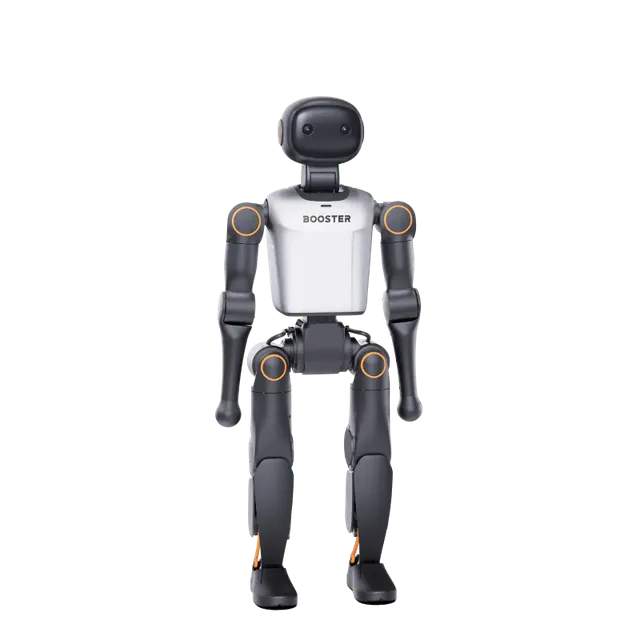
Booster K1 Humanoid Robot — Python SDK, Walking Control & Teleop Guide
Complete guide to connecting, programming, and teleoprating the Booster K1 full-body humanoid robot using the Booster Python SDK and the RoboticsCenter platform agent.
1. Overview
The Booster K1 is a full-body humanoid robot developed by Booster Robotics, designed for research-grade bipedal locomotion, whole-body manipulation, and embodied AI experiments. With 22 degrees of freedom distributed across a human-like kinematic chain — including an articulated head, bilateral arms, and full leg assemblies — the K1 is built to operate in human environments at human scale.
The K1 targets the intersection of locomotion and manipulation research. Its WALK mode enables stable bipedal gait over flat terrain and stairs, while CUSTOM mode exposes all 22 joints for direct torque and position control, enabling loco-manipulation experiments, whole-body motion planning, and novel gait development without modifying the onboard firmware. The built-in agent system adds out-of-the-box behaviors — soccer, dance, conversational interaction — that researchers can use as baselines or building blocks.
Professionals choose the K1 because the Booster Python SDK provides a clean, high-level API that abstracts motor-level complexity while still exposing low-level joint control for advanced work. Combined with the RoboticsCenter teleop platform, teams can remotely operate the K1, collect full-body demonstration data, and stream joint telemetry to dashboards — all from a browser.
2. Full Specs
| Property | Value |
|---|---|
| Vendor | Booster Robotics |
| Model | K1 |
| Form factor | Full-body bipedal humanoid |
| Total DOF | 22 |
| Head DOF | 2 — yaw (pan) and pitch (tilt) |
| Head yaw range | approx. −90° to +90° |
| Head pitch range | approx. −40° to +30° |
| Arm DOF | Multiple per arm (bilateral) |
| Leg DOF | Full bipedal kinematics per leg |
| Control modes | DAMP, PREP, WALK, CUSTOM, PROTECT |
| Network interface | Wired Ethernet |
| Default wired IP | 192.168.10.102 |
| Computer IP (wired) | 192.168.10.10 / netmask 255.255.255.0 |
| Wireless connection | Via Booster App (IP assigned dynamically) |
| SSH access | ssh booster@192.168.10.102 · password: 123456 |
| SDK package | booster_robotics_sdk_python (PyPI) |
| Walk speed (forward/back) | −0.5 to +0.5 m/s |
| Walk speed (lateral) | −0.5 to +0.5 m/s |
| Rotation speed | −1.0 to +1.0 rad/s |
| Battery telemetry | Yes — status.battery_percentage |
| IMU telemetry | Yes — status.imu_status |
| Agent system | Default, Soccer, HiChat, Dance, LionDance |
| Platform agent | k1_agent.py |
| Official SDK repo | github.com/BoosterRobotics/booster_robotics_sdk |
3. Quick Start
From unboxing to your first walking command in five steps:
-
Install the Booster SDK. The official Python SDK is distributed on PyPI and requires Python 3.8+.
pip install booster_robotics_sdk_python --user
-
Configure Ethernet and connect. Set your computer's wired interface to IP
192.168.10.10, netmask255.255.255.0, gateway192.168.10.1. The robot's default IP is192.168.10.102. Verify with:ping 192.168.10.102
For wireless, configure WiFi via the Booster App and note the assigned IP. -
Power on and wait for ready state. The robot initializes in DAMP mode. Wait until the status LEDs indicate standby before sending any SDK commands. SSH in if you need to inspect system logs:
ssh booster@192.168.10.102 # password: 123456 booster-cli launch -c status # verify service is running
-
Enter PREP mode and stand the robot.
import booster import time client = booster.BoosterClient("192.168.10.102") client.change_mode(booster.Mode.PREP) time.sleep(3) # wait for robot to stand and stabilize print("Robot is standing in PREP mode.") -
Enter WALK mode and move forward.
client.change_mode(booster.Mode.WALK) time.sleep(2) client.walk(0.2, 0.0, 0.0) # forward 0.2 m/s time.sleep(3) client.walk(0.0, 0.0, 0.0) # stop client.change_mode(booster.Mode.PREP) # return to standing
4. Control Modes
The K1 state machine defines five modes. Understanding the valid transitions is critical to safe operation.
| Mode | Description | Entry method (SDK) | Entry method (remote) |
|---|---|---|---|
| DAMP | Damping mode. All joints have passive resistance. Safe default state for power-on and shutdown. | client.change_mode(Mode.DAMP) |
LT + BACK |
| PREP | Preparation mode. Robot stands upright and holds position using the balance controller. | client.change_mode(Mode.PREP) |
LT + START |
| WALK | Walking mode. Full bipedal gait controller active. Accepts velocity commands and predefined actions. | client.change_mode(Mode.WALK) |
RT + A (from PREP) |
| CUSTOM | Custom mode. Direct joint-level control for advanced research. Requires physical support fixture. | client.change_mode(Mode.CUSTOM) |
SDK only |
| PROTECT | Protection mode. Automatically entered when a fault is detected. Requires fault clearance to exit. | Automatic | Automatic |
Walking velocity parameters
The client.walk(forward, lateral, angular) call accepts three float parameters:
| Parameter | Range | Units | Notes |
|---|---|---|---|
| forward | −0.5 to +0.5 | m/s | Positive = forward, negative = backward |
| lateral | −0.5 to +0.5 | m/s | Positive = right, negative = left |
| angular | −1.0 to +1.0 | rad/s | Positive = turn left, negative = turn right |
Remote controller shortcuts
The K1 ships with a gamepad-style remote controller. Key mappings for mode control and walking:
- LT + START: Enter PREP mode
- RT + A: Enter WALK mode (must be in PREP first)
- LT + BACK: Enter DAMP mode
- Left stick: Walk direction (WALK mode)
- Right stick: Turn direction (WALK mode)
- D-Pad: Head movement
- A: Handshake · B: Wave · X: Otter Man · Y: Bow
- RB + A: Fortune Cat · RB + B: Hip-hop Superman · RB + X: Cheer · RB + Y: Carry
Predefined actions
Call client.play_action(name) in WALK mode to trigger built-in motion sequences:
client.play_action("wave") # wave hand
client.play_action("handshake") # handshake
client.play_action("bow") # bow
client.play_action("fortune_cat") # fortune cat pose
client.play_action("hiphop_superman") # hip-hop superman
client.play_action("cheer") # cheer
client.play_action("new_year_dance") # new year dance
client.play_action("rock_dance") # rock dance
client.play_action("future_dance") # future dance
5. SDK / Python Integration
Installation
pip install booster_robotics_sdk_python --user
Full status read and telemetry
import booster
client = booster.BoosterClient("192.168.10.102")
status = client.get_robot_status()
print(f"Mode: {status.mode}")
print(f"Battery: {status.battery_percentage:.1f}%")
print(f"IMU: {status.imu_status}")
Head pose control
Head yaw and pitch are controlled via client.set_head_pose(yaw_rad, pitch_rad). Convert degrees to radians before calling:
import math def deg2rad(d): return d * math.pi / 180.0 # Look 30° to the left and 10° down client.set_head_pose(deg2rad(30), deg2rad(-10)) # Return to center client.set_head_pose(0.0, 0.0)
CUSTOM mode joint control
CUSTOM mode exposes all 22 joints. Only enter this mode with the robot on a lifting device or suspended fixture.
# WARNING: Use CUSTOM mode only with robot physically supported client.change_mode(booster.Mode.CUSTOM) # Joint indexing: j1=head_yaw, j2=head_pitch, j3–j22=body joints # Refer to the K1 Instruction Manual for the full joint map
Robot service management (SSH)
ssh booster@192.168.10.102 booster-cli launch -c status # check service state booster-cli launch -c start # start robot service booster-cli launch -c stop # stop robot service booster-cli launch -c restart # restart robot service # Check firmware version cat /opt/booster/version.txt # Collect logs for a time window booster-cli log -st 20260403-120000 -et 20260403-130000 -o /home/booster/Documents
Agent modes
The K1 includes a built-in agent runtime. Switch agents programmatically:
client.enter_agent("default") # Booster default
client.enter_agent("soccer") # soccer agent
client.enter_agent("hi_chat") # conversational AI agent
client.enter_agent("dance") # dance agent
6. ROS2 Integration
The Booster K1 can be integrated into a ROS2 workspace using either the URDF model for simulation and visualization, or a bridge node that forwards SDK commands and telemetry over ROS2 topics.
URDF / XACRO model
The K1 URDF is available from the Booster SDK repository and describes the full kinematic chain including all 22 joints. Load it into your workspace:
# Clone the SDK (includes URDF) git clone https://github.com/BoosterRobotics/booster_robotics_sdk.git cd booster_robotics_sdk # Copy URDF to your ROS2 workspace cp -r urdf/ ~/ros2_ws/src/booster_k1_description/ # Build cd ~/ros2_ws && colcon build --packages-select booster_k1_description source install/setup.bash
Visualize in RViz2
ros2 launch booster_k1_description display.launch.py
ROS2 bridge node pattern
Wrap the Booster SDK client in a ROS2 node to publish joint states and subscribe to velocity commands. Below is the minimal pattern:
import rclpy
from rclpy.node import Node
from sensor_msgs.msg import JointState
from geometry_msgs.msg import Twist
import booster, time
class K1ROS2Bridge(Node):
def __init__(self):
super().__init__("k1_bridge")
self.client = booster.BoosterClient("192.168.10.102")
self.pub = self.create_publisher(JointState, "/k1/joint_states", 10)
self.sub = self.create_subscription(Twist, "/cmd_vel", self.on_cmd_vel, 10)
self.create_timer(0.05, self.publish_telemetry) # 20 Hz
def on_cmd_vel(self, msg):
self.client.walk(msg.linear.x, msg.linear.y, msg.angular.z)
def publish_telemetry(self):
status = self.client.get_robot_status()
js = JointState()
js.header.stamp = self.get_clock().now().to_msg()
# Populate js.name / js.position from status
self.pub.publish(js)
def main():
rclpy.init()
node = K1ROS2Bridge()
rclpy.spin(node)
if __name__ == "__main__":
main()
Key ROS2 topics (convention)
| Topic | Type | Description |
|---|---|---|
/k1/joint_states | sensor_msgs/JointState | 22-DOF joint positions and velocities |
/cmd_vel | geometry_msgs/Twist | Walk velocity commands (linear.x, linear.y, angular.z) |
/k1/battery | sensor_msgs/BatteryState | Battery percentage and charge status |
/k1/imu | sensor_msgs/Imu | IMU orientation and angular velocity |
7. Platform Teleop Integration
The k1_agent.py script bridges the Booster K1 to the Fearless Platform teleop system via WebSocket, enabling remote operation, joint monitoring, and demonstration data collection from a browser.
Starting the agent
# Install dependency pip install websockets # Real hardware python k1_agent.py \ --backend wss://your-backend.run.app \ --session YOUR_SESSION_ID \ --node-id k1-lab-01 \ --telemetry-hz 8 # Mock mode (no K1 required) python k1_agent.py \ --backend ws://localhost:8000 \ --session test-session \ --mock
Telemetry payload
The agent streams a structured telemetry frame at the configured rate (default 8 Hz). Each frame includes:
- Joint angles for 6 primary joints in degrees (
j1–j6) - Motor states: position, RPM, temperature per motor
- Walk velocity components:
vx,vy,wz - Battery percentage and current mode string
- Active agent name (Default / Soccer / Dance / HiChat)
- Millisecond timestamp for frame alignment
Supported command types
The platform sends JSON command frames to the agent. Supported types:
| Type | Parameters | Effect |
|---|---|---|
move | axis, dir | Walk along x/y axis or rotate on z axis |
stop | — | Zero all walk velocities immediately |
move_joint | joint, dir, step_deg | Step a named joint by step_deg degrees |
cartesian_move | axis, dir, frame | Head pitch (rx), head yaw (ry), body yaw (rz) |
gesture | name | Execute named gesture: wave, nod, bow |
voice_command | text | NL command: "walk forward", "turn left", "dance", etc. |
robot_query | text | Query robot state; agent replies via robot_reply message |
8. Troubleshooting
| Symptom | Likely cause | Fix |
|---|---|---|
| Connection refused / timeout | Ethernet not configured correctly or robot not powered on | Set your computer's IP to 192.168.10.10 / netmask 255.255.255.0. Ping 192.168.10.102. Confirm robot LED indicators show active state. SSH in and run booster-cli launch -c status. |
| Robot enters PROTECT mode immediately | Fault condition: surface not flat, joint position error, or communication dropout | Place the robot on a flat, hard surface. Restart the robot service via SSH: booster-cli launch -c restart. Allow a full boot cycle before reconnecting. |
| WALK mode exits unexpectedly | Balance controller lost stability or step sequence failed | Re-enter PREP from DAMP, wait 3 seconds for full stabilization, then re-enter WALK. Do not command lateral speeds above 0.3 m/s until the robot is well calibrated on your floor surface. |
| SDK ImportError: no module named booster | SDK not installed or installed to wrong Python environment | Run pip install booster_robotics_sdk_python --user. Verify with python -c "import booster; print('OK')". If using a virtual environment, activate it first. |
| Head not responding to set_head_pose | Robot not in PREP or WALK mode, or angle exceeds hardware limits | Confirm mode with client.get_robot_status().mode. Clamp yaw to −90°/+90° and pitch to −40°/+30° before converting to radians. Do not call set_head_pose in DAMP mode. |
booster-cli log -st YYYYMMDD-HHMMSS -et YYYYMMDD-HHMMSS -o /home/booster/Documents. Share the log with SVRC support or post in the community forum.